ProstoCADParts · Assemblies · STL
NewProstoCAD 0.12.0 — InnCad Plus is now ProstoCAD — plus Delete for dimensions, rectangle diagonals and a smoother Symmetric · ProstoCAD for FreeCAD 0.13.0 — InCad is now ProstoCAD for FreeCAD — plus Delete for dimensions, rectangle diagonals and a smoother SymmetricWhat changed →

A new CAD in town…

Free · on the FreeCAD 1.1.3 engine

Parametric CADfor 3D printing enthusiasts.

Prosto. Presto. Printed.

ProstoCAD + your idea = a printed part

For people who don't want to spend a fortune on a hobby and won't use pirated software. ProstoCAD is free: parts and assemblies, tools that turn an STL back into a real part, and a built-in link to your AI — Claude Code, Codex or Gemini CLI builds the part in your window.

Version 0.12.0FreemacOS (Apple Silicon) · Windows x64 · Linux soon

ProstoCAD is the new name of InnCad Plus.

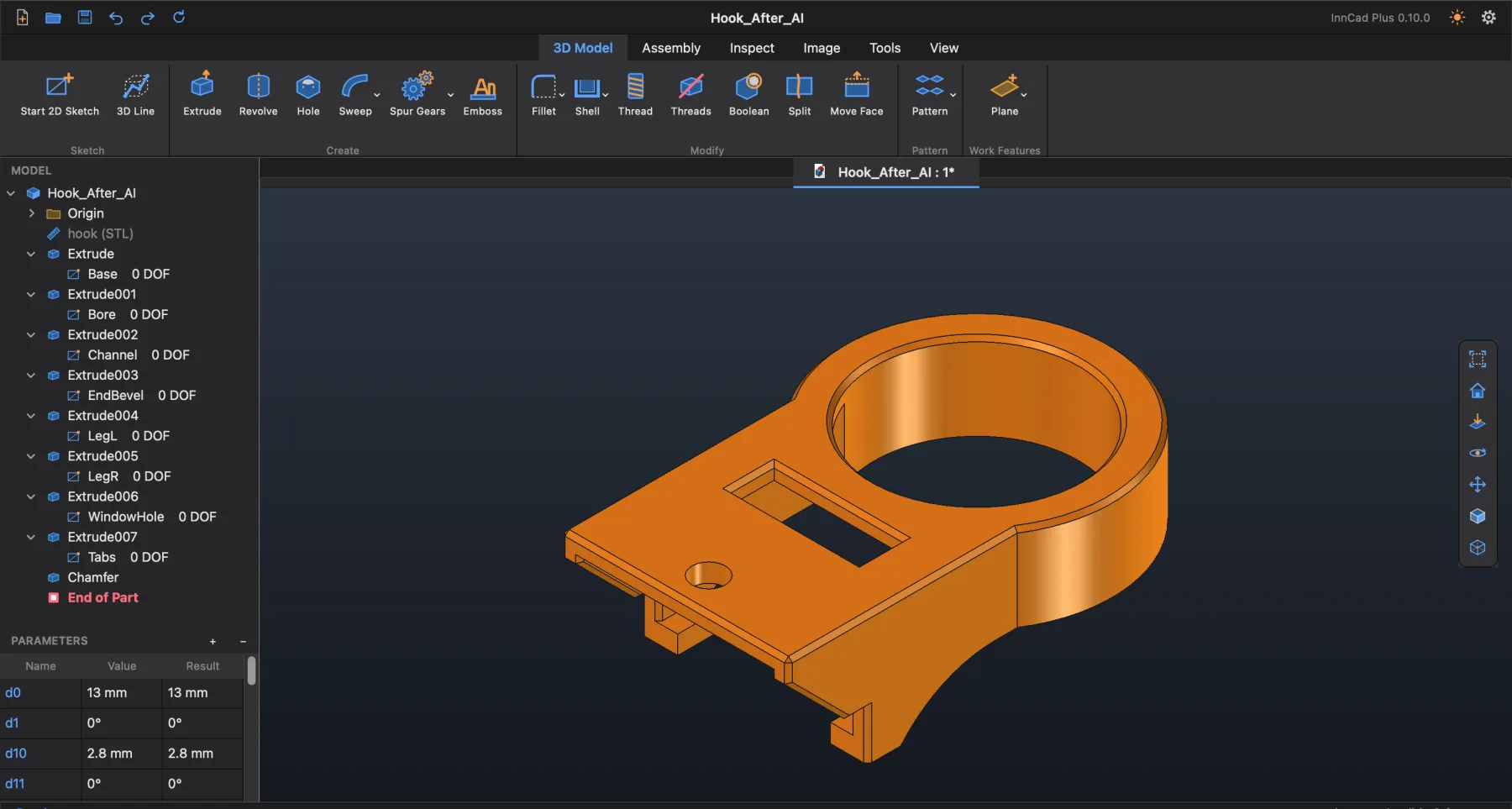
The ProstoCAD window: ribbon, Model Browser, Parameters and a part

All screenshots on this site are real: they were made in ProstoCAD and its FreeCAD addon.

Parametric Modeling

Sketches with dimensions and formulas, features with a live preview, assemblies with joints.

STEP / STL / IGES

Open STEP and STL, import IGES and OBJ, export STEP for other CAD programs and STL for slicers.

STL to a Real Part

Mesh Section and Smooth rebuild a mesh as editable features — or Connect AI lets your AI do it.

Standalone App

The FreeCAD 1.1.3 engine is inside: nothing else to install. Works on your machine; files stay plain .FCStd.

Real threads

Real threads, ready for 3D printing, in a few clicks

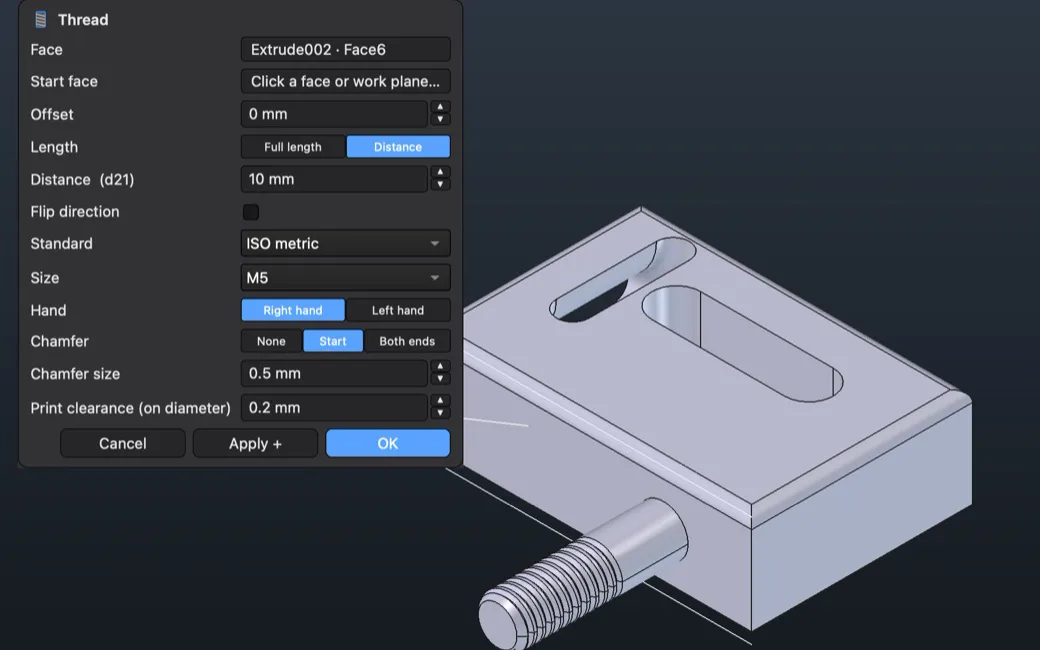
A real helical thread you can print, not a texture — in a finished hole or on a shaft: pick the round face and a size, or let Auto match the hole. ISO metric, UNC / UNF, G, Trapezoidal, Print-friendly with flat crests, or Custom — your own pitch, flank angle and depth for jars, lids and anything non-standard. A print clearance of any size (0.2 mm by default) lets printed parts screw together.

The Thread dialog and a print-ready M5 thread
AI × 3D printing

AI optimization for 3D printing, with a minimum of supports

Ask your AI to prepare the part for printing: it can turn overhangs into 45° chamfers, give the part a flat base and split what cannot print in one piece. Every change is an ordinary feature in the history — check it, edit it or undo it.

Connect AI

> Optimize this part for 3D printing with as few supports as possible.

✓ Overhangs replaced with 45° chamfers

✓ Flat base on the largest face

✓ Each step in the Model Browser — Undo takes it back

3D sketch

3D lines in a 3D sketch, on a virtual cube

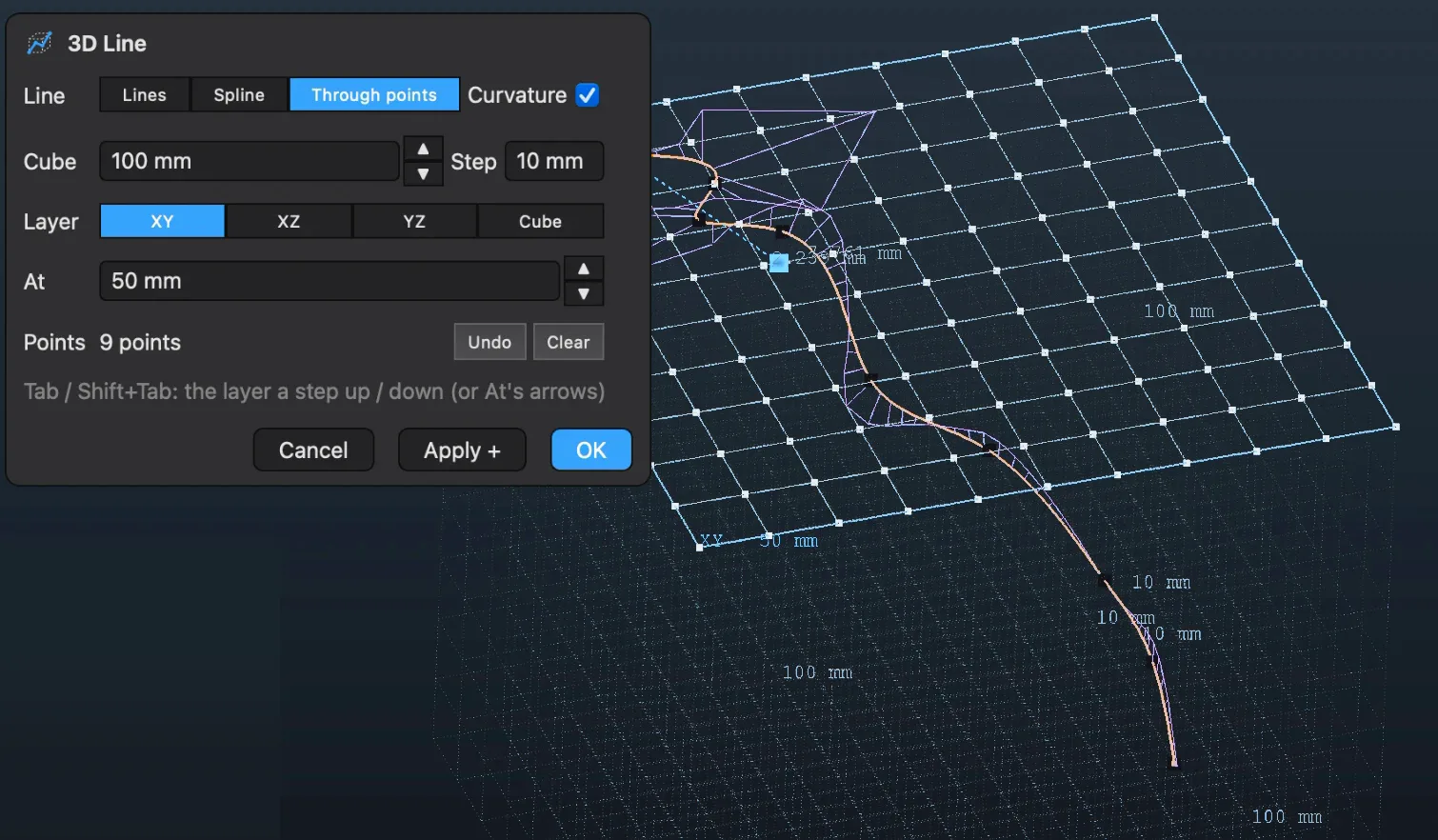
A very easy way to draw in space: a cube of virtual points around the origin, its size and step are yours. The line runs in all three directions: pick points on any layer — XY, XZ, YZ — or in the whole Cube; Tab / Shift+Tab steps the layer, points drag with the mouse. Lines, Spline or Through points — the line becomes a path for Sweep and Loft.

A 3D line through points on different layers of the virtual cube
Photo → real size

One photo and one measurement — real dimensions

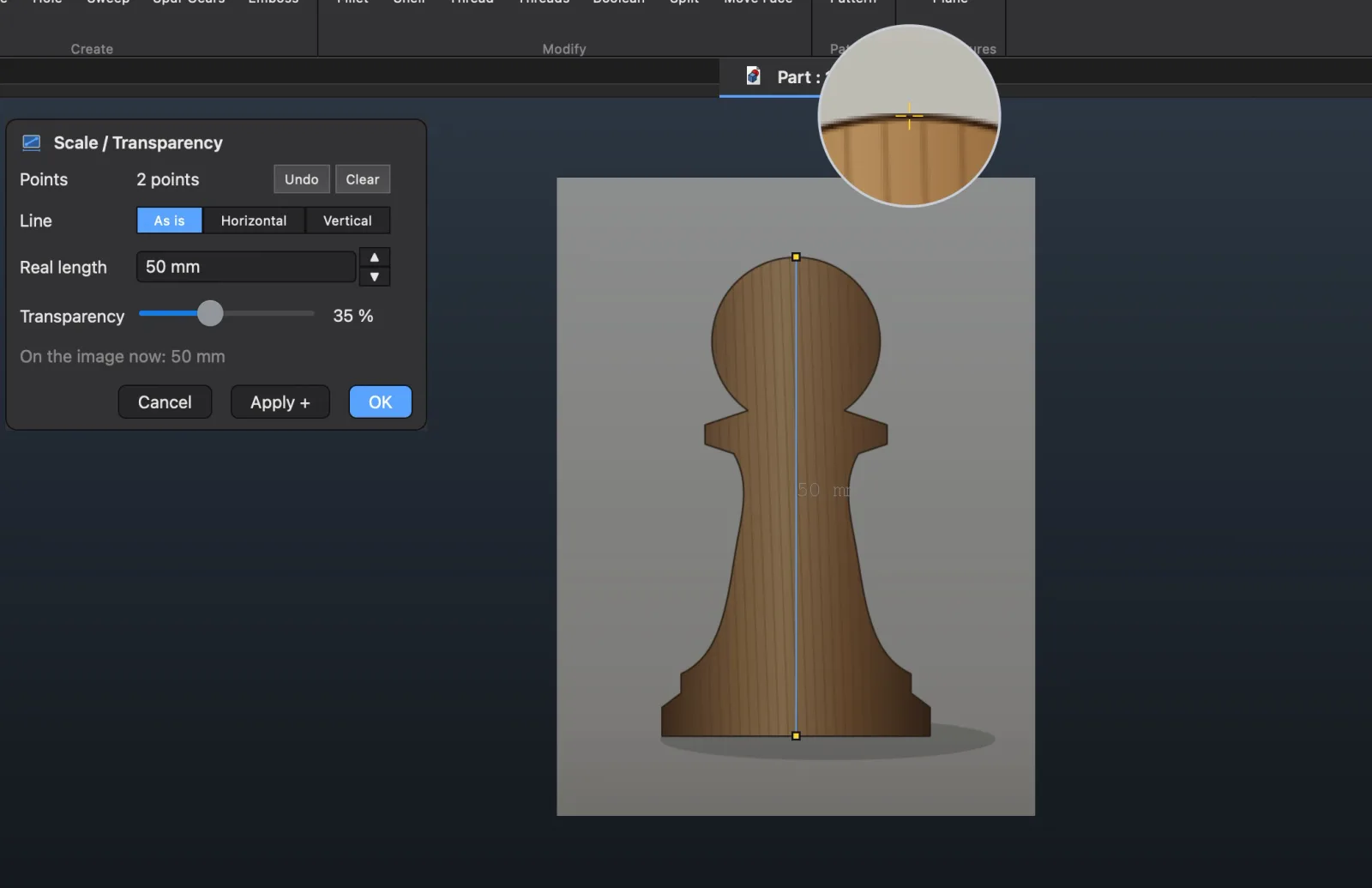
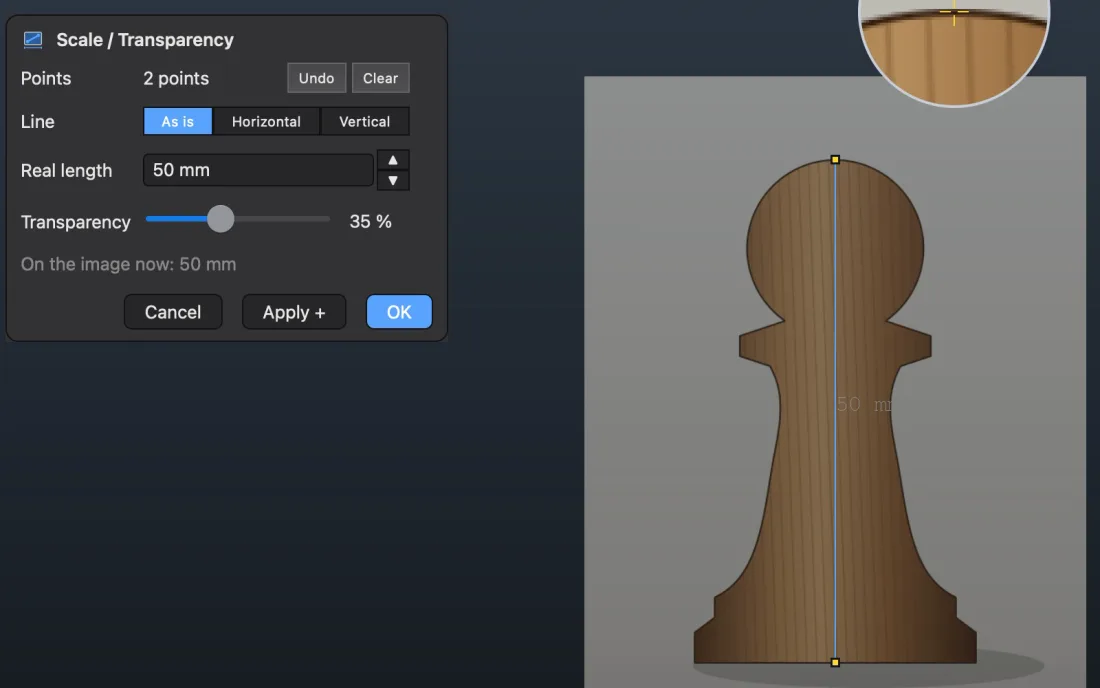
Insert a photo, click two points and type one real length: the whole picture scales, and you design over it in true millimeters. Photo taken at an angle? Horizontal or Vertical turns it so that line is level.

Scale a photo by two points and one real length; level it with Horizontal or Vertical
Emboss · Engrave

Text and any sketch — raised or engraved on any face

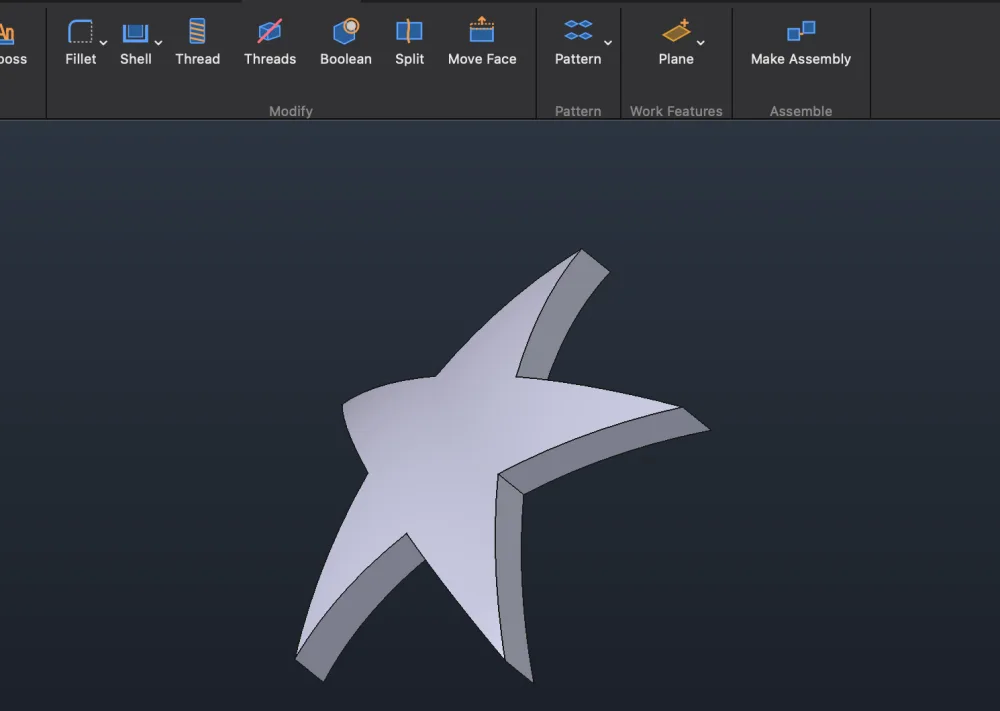
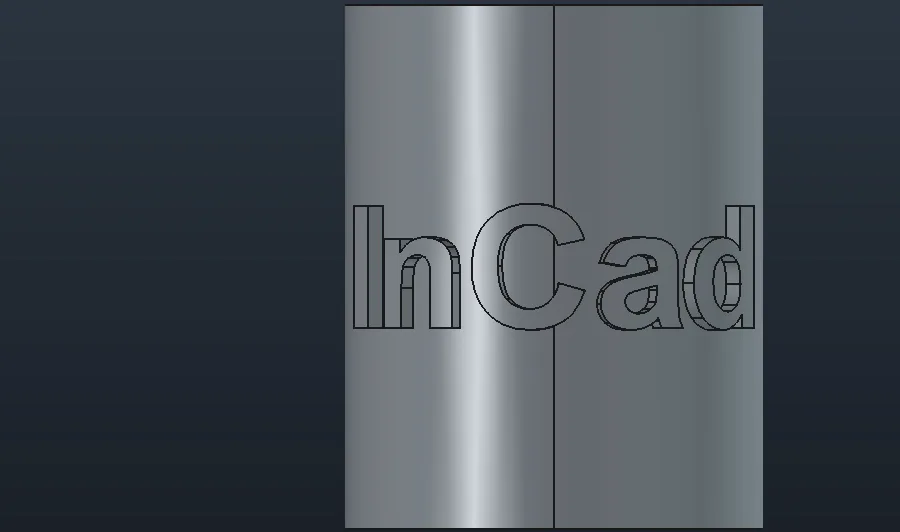
Emboss raises a Text or any closed sketch — letters, a logo, a star — and Engrave cuts it in: on flat faces, wrapped round cylinders and cones, projected onto spheres. Letters that run past a face carry on round onto the faces that continue it smoothly, so mixed surfaces work too. Any installed font, several lines, Cyrillic, text along a curve; Evenly round spreads a word all the way round.

A star made in ProstoCAD
Text embossed round a cylinder
Gears · Worms

Gears and worm drives in one dialog

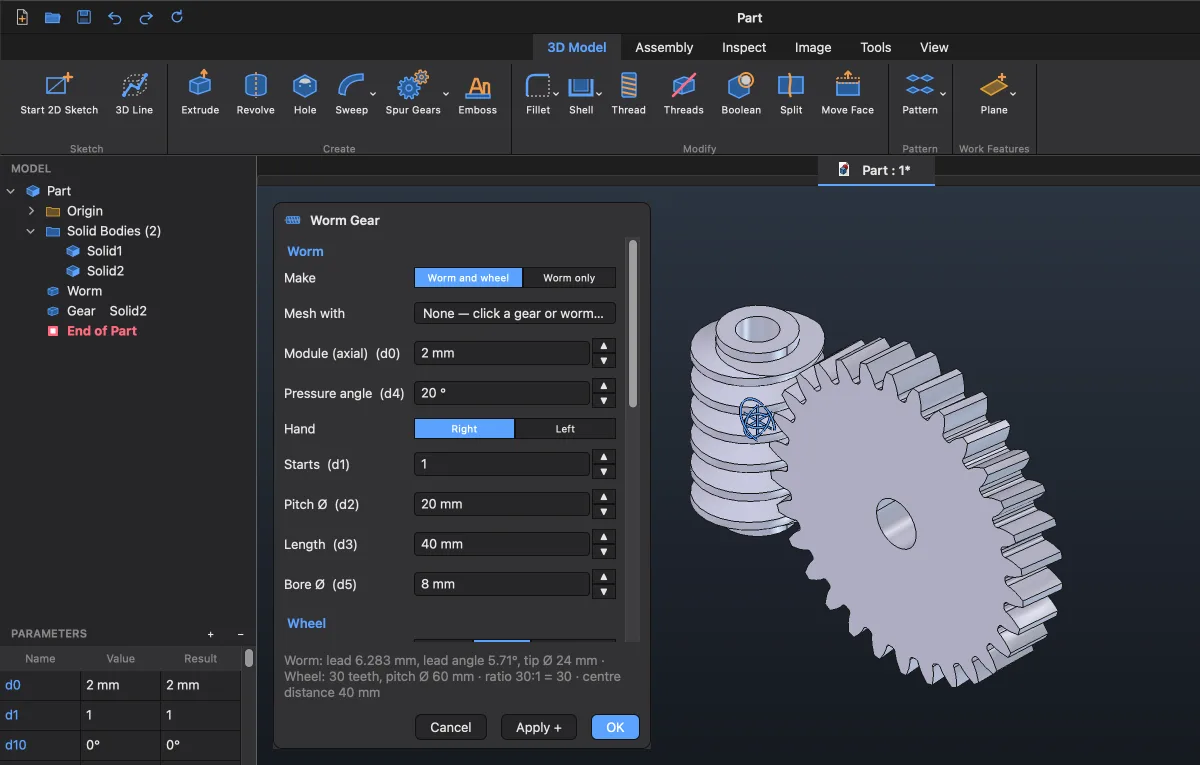
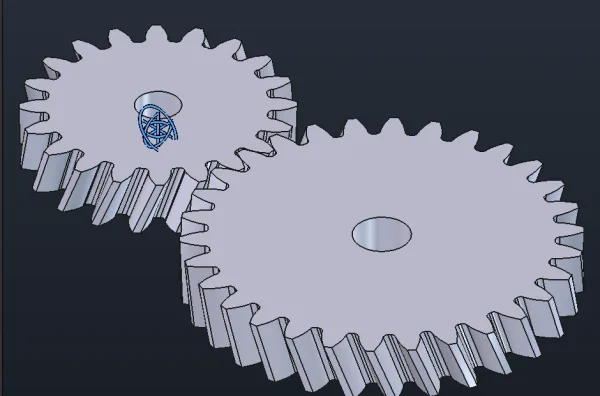
Spur Gears makes a meshing pair at once, no sketch: involute teeth, straight or helical (5–45°), sized by teeth, ratio or center distance, with bores for the shafts. Worm Gear makes the worm and its wheel, 1–6 starts. A third gear meshes with one already there; Make Assembly puts every gear into a part of its own.

The Spur Gears dialog and a helical pair in mesh
The Worm Gear dialog with the worm and its wheel
Pattern

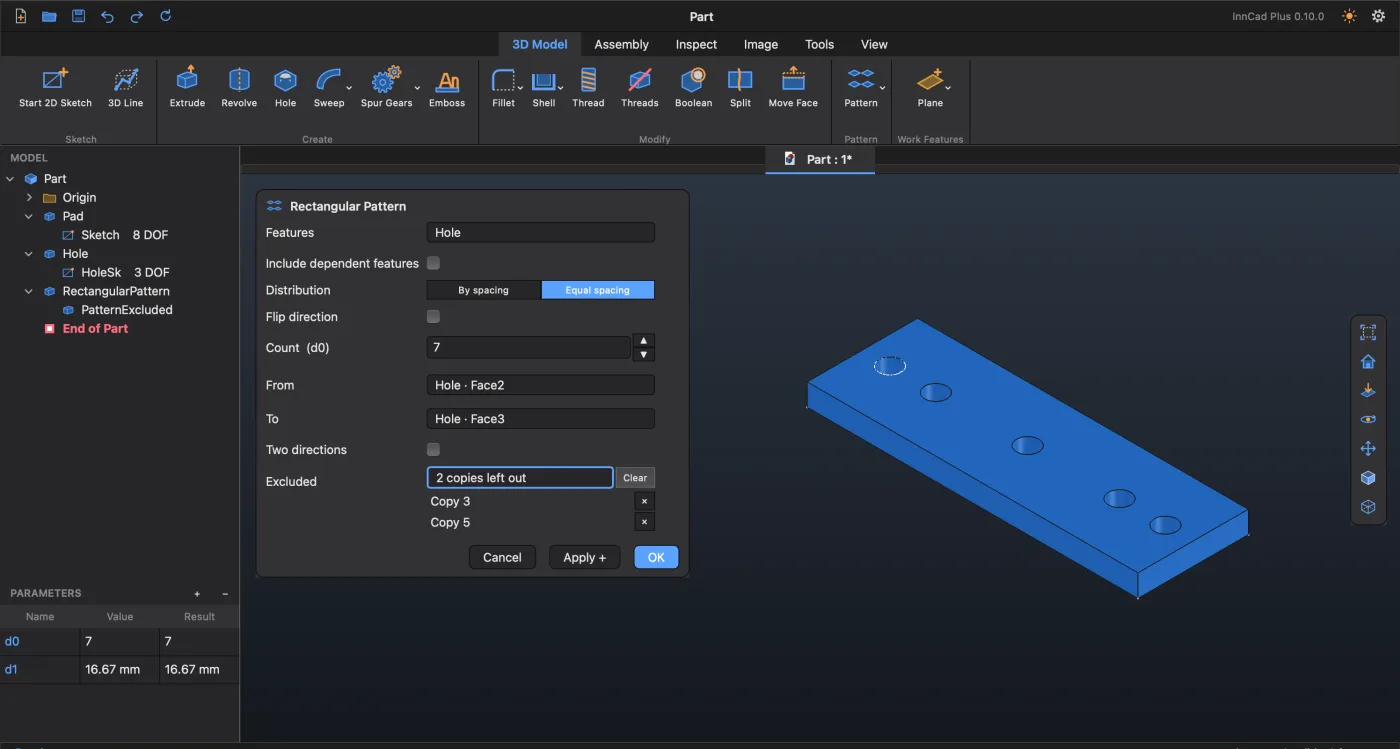
Patterns: spread evenly between two faces, skip the copies you don't need

Equal spacing spreads the copies evenly between two limits — two faces, edges or points — so you never count the step yourself. Excluded: click the copies you don't need right on the model and they are left out; ✕ brings one back. Rectangular, circular and Mirror for features; in sketches also Along Path — copies placed along any curve: lines, arcs, splines.

A rectangular pattern with Equal spacing between the plate's end faces, copies 3 and 5 left out
Split for printing

Too big for the printer? Split it — with a dovetail

Draw the cut line in a sketch — straight, an arc or a dovetail — and Split ▸ Keep all cuts the part along it, every piece a Solid of its own. Any clearance you need: draw the line a second time with Offset by the gap — the thin strip between the lines becomes a Solid too; delete it, and the gap is there. Then Make Assembly turns the pieces straight into an assembly, each a part ready to print; the dovetail holds the printed pieces together.

1 2 Split
Scheme

System Requirements

The FreeCAD 1.1.3 engine is inside — no FreeCAD to install.

macOS

  • macOS 13 Ventura or later
  • Apple Silicon: M1 or newer
  • About 1 GB of disk space
  • From a USB stick: soon

Windows

  • Windows 10 or 11, 64-bit (x64)
  • About 600 MB of disk space
  • No administrator rights needed
  • Runs straight from a USB stick

Linux soon

  • A Linux version is coming soon

Not in this build: Intel Macs. Linux: coming soon.

For the AI link (optional): Claude Code, Codex or Gemini CLI, signed in with your own account.

Download ProstoCAD

Version 0.12.0 · released October 27, 2026 · free

macOS

Download for Mac

ProstoCAD-0.12.0-macos-arm64.dmg · 186 MB

SHA-256e54a48b14c84d8fe05507faeed121c91687ce5a284867c679b3a5596432676f9

Drag ProstoCAD.app onto Applications. The first time, macOS asks to confirm: Open Anyway.

Windows Portable

Download Windows Portable

ProstoCAD-0.12.0-windows-x64.zip · 188 MB

SHA-25671a8ecc564858ef8c181fab4c1ddaa86fe70b9ff4180c0fb1644a248883cf8cd

No installation needed. Unzip and use. Use a short path with Latin letters only, then run ProstoCAD.exe.

Linux

A Linux version is on its way. Come back soon — until then ProstoCAD is here for Mac and Windows.

Come back often: ProstoCAD gets better almost every day, and a new version may already be waiting for you.

For FreeCAD users

ProstoCAD for FreeCAD — the addon

For those who opened FreeCAD after years in another CAD.

Already have FreeCAD 1.1? ProstoCAD for FreeCAD adds the same parametric tools to it as a workbench: the ribbon, the Model Browser, feature dialogs, assemblies. Free, and your files stay plain .FCStd. The STL tools and Connect AI are in ProstoCAD only.

One button — Return to FreeCAD — and you are back in FreeCAD's own interface.

A pair of gears made with Spur GearsFinallySpur gears and worm drives are in the addon too, from version 0.11.

FreeCAD 1.1 (tested with 1.1.3) · macOS on Apple Silicon or Windows 10 / 11 x64

Mac: install with FreeCAD's Addon Manager, the steps are in README.txt inside the ZIP. Windows: unzip and run install.bat.

Come back often: the addon gets better almost every day, and a new version may already be waiting for you.

Updates

What's new in ProstoCAD

The latest version of each: what was added and what was fixed. Earlier versions are on GitHub: ProstoCAD, ProstoCAD for FreeCAD.

ProstoCAD0.12.0

InnCad Plus is now ProstoCAD — plus Delete for dimensions, rectangle diagonals and a smoother Symmetric

Added

  • A new name, the same program: your files open as before, and on its first start ProstoCAD takes over InnCad Plus's settings by itself.
  • Every rectangle gets its two diagonals and a centre point as construction: one constraint (the centre on the origin) centres it. A rounded rectangle's diagonals join its corner centres.
  • Right-click in a sketch offers Delete for whatever is selected, dimensions too; Parameters can delete a sketch dimension.

Fixed

  • After Symmetric the lines could not be dragged: the tool now ends once the pair is made.
Release notes on GitHub →

ProstoCAD for FreeCAD0.13.0

InCad is now ProstoCAD for FreeCAD — plus Delete for dimensions, rectangle diagonals and a smoother Symmetric

Added

  • A new name, the same workbench: in FreeCAD it shows as ProstoCAD, and every file made before opens as it did.
  • Every rectangle gets its two diagonals and a centre point as construction: one constraint (the centre on the origin) centres it. A rounded rectangle's diagonals join its corner centres.
  • Right-click in a sketch offers Delete for whatever is selected, dimensions too; Parameters can delete a sketch dimension.

Fixed

  • After Symmetric the lines could not be dragged: the tool now ends once the pair is made.
Release notes on GitHub →

How it works

Familiar to anyone who has used a parametric CAD

A ribbon, a Model Browser with the history, feature dialogs with a live preview, a Parameters table with formulas, marking menus on the right mouse button. Underneath it is ordinary FreeCAD geometry.

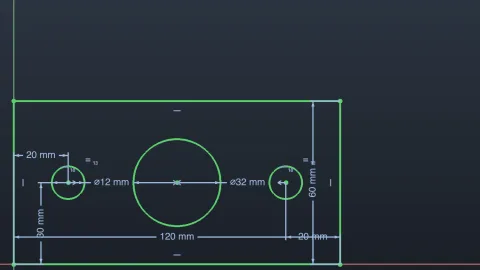
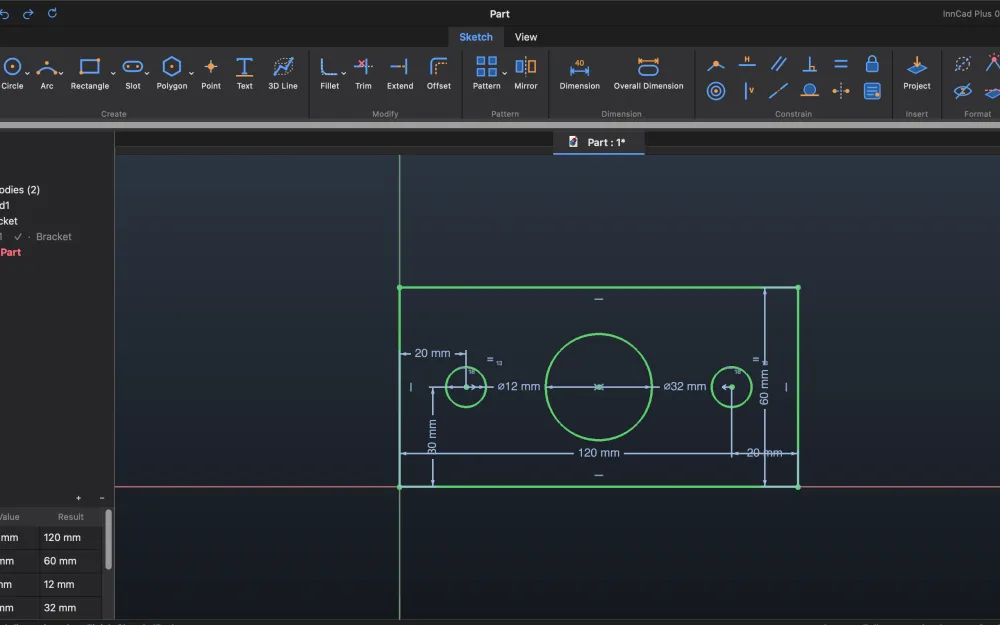
A fully constrained sketch with dimensions

Sketch

Lines, arcs, splines and text; dimensions typed while you draw; a Constraint List; sketch patterns.

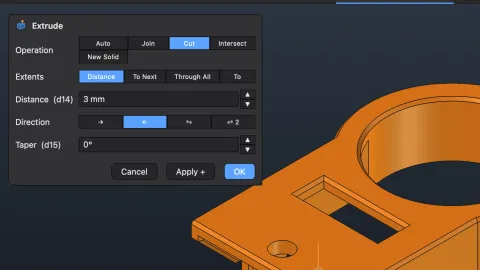
The Extrude dialog with its preview on the part

Features

Extrude, Revolve, Hole, Fillet, Shell, Sweep, Loft, Thread, Emboss, gears — each with a live preview and drag handles.

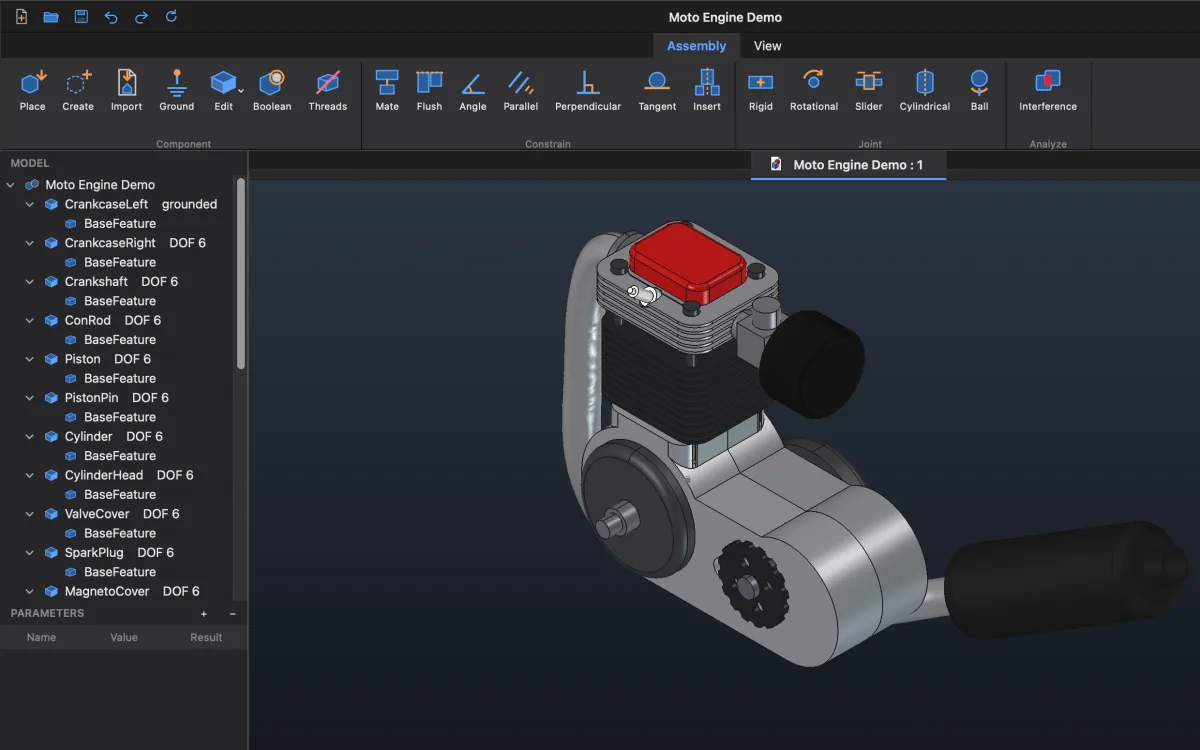
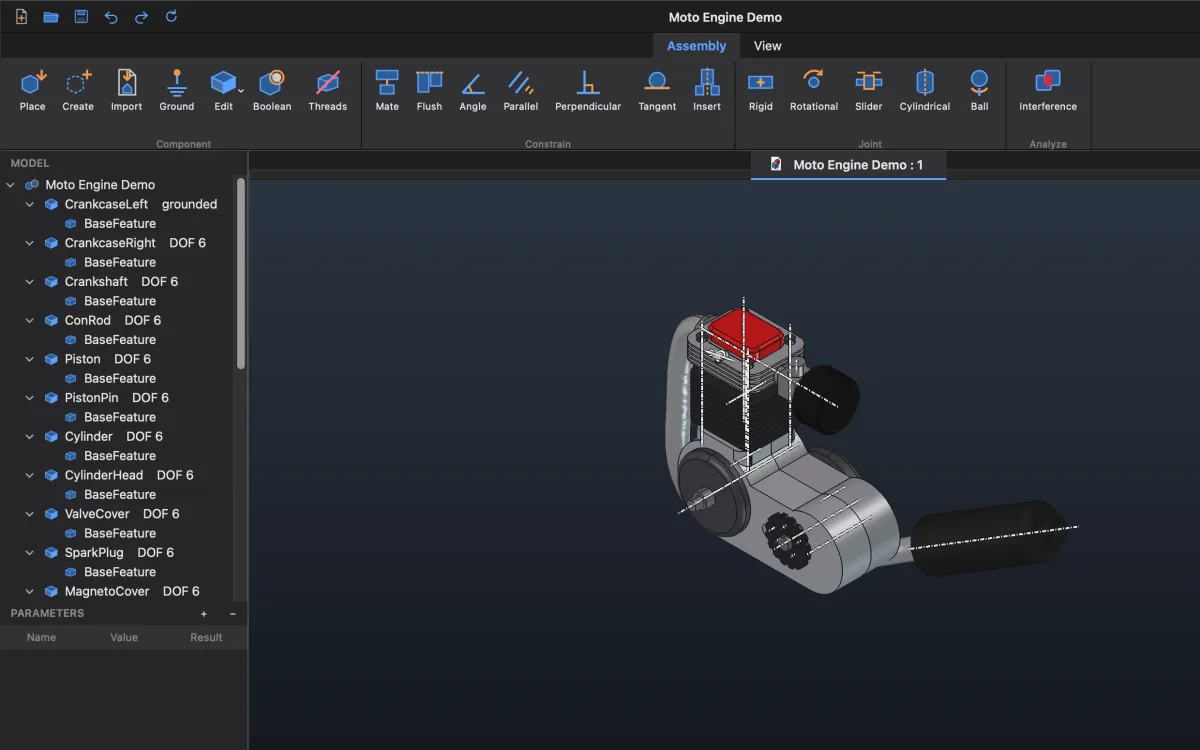
The Moto Engine Demo assembly in ProstoCAD: 23 parts, each with its degrees of freedom

Assemblies

Mate, Flush, Insert and more on FreeCAD's own joints; a gizmo moves a part only where it is still free.

Assembly · View ▸ Section

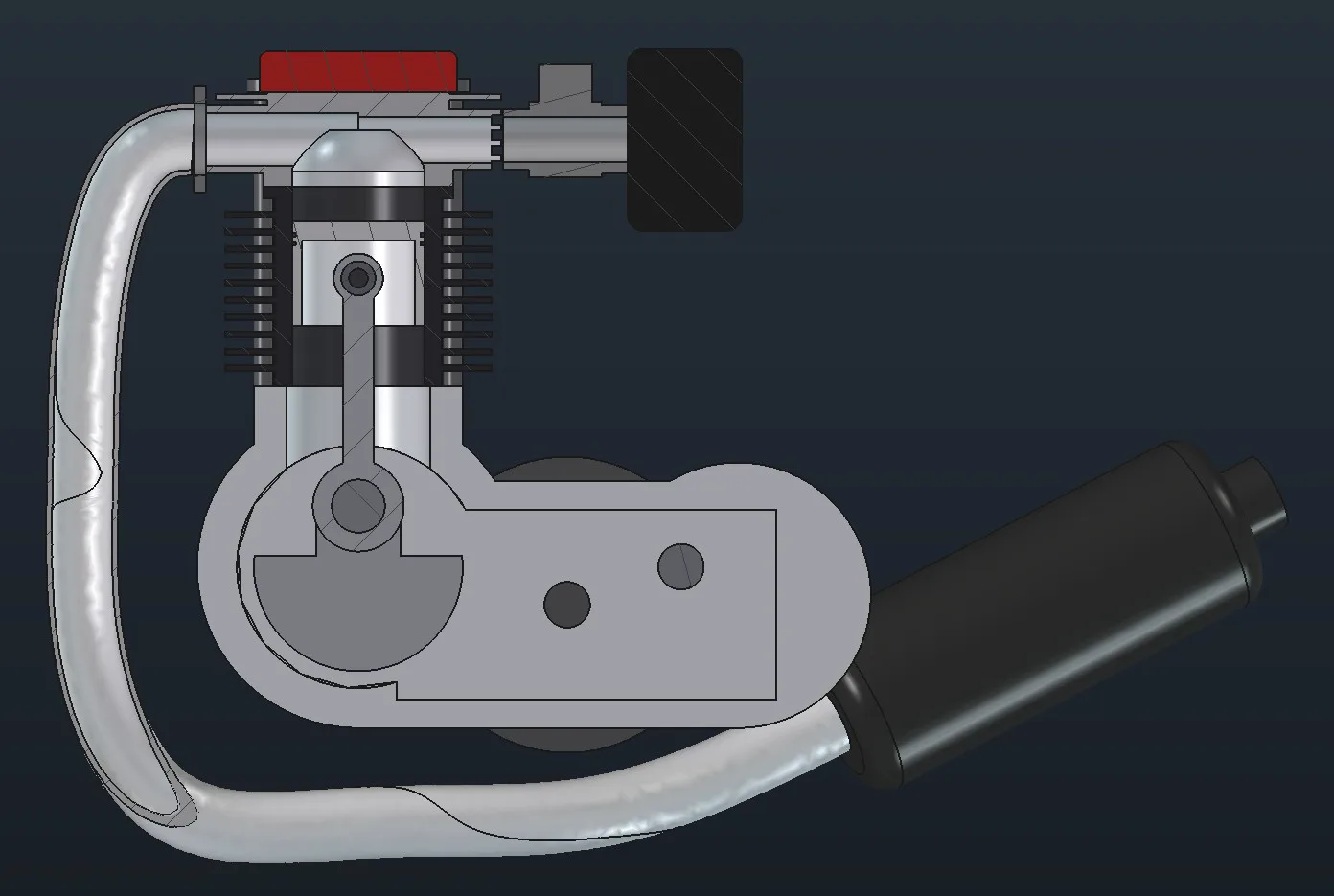
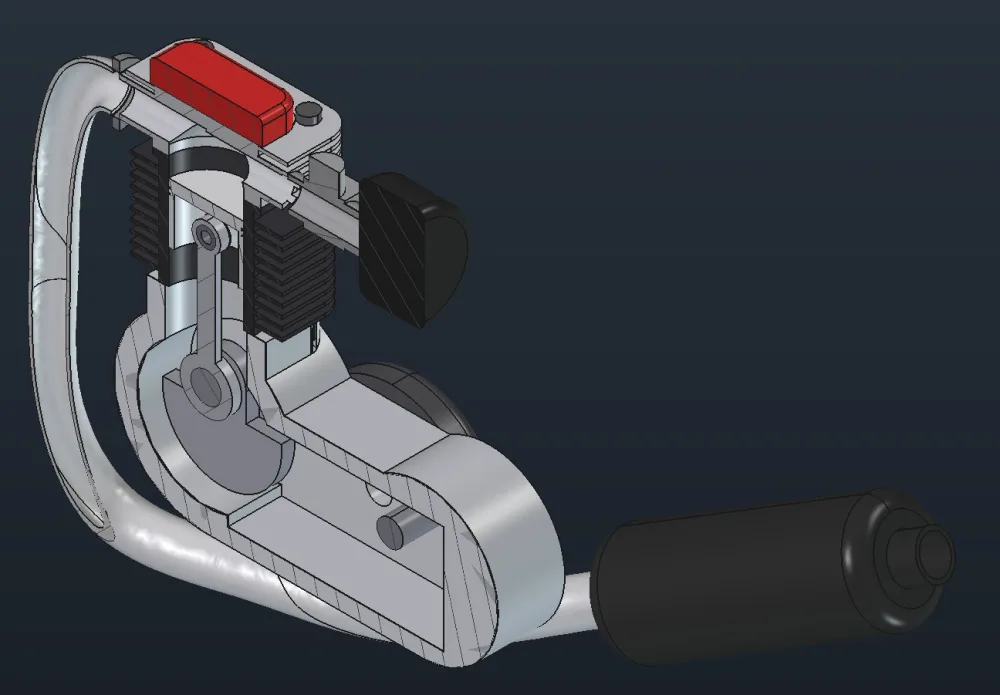
Cut the whole assembly — every part in its color

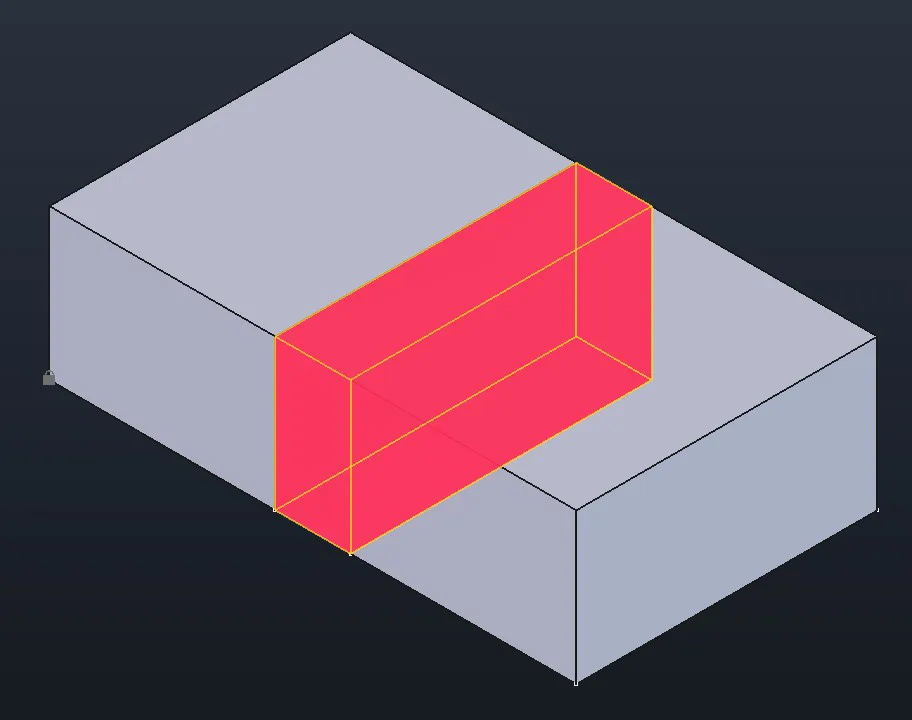
The plane cuts every part it meets, each with its own hatching. Interference shows where parts go into each other, in bright red, with the volume.

Section of a 20-part engine assembly

Moto Engine Demo — a 20-part assembly made in FreeCAD, cut in ProstoCAD.

The engine assembly in 3D
Interference in bright red
  • Any shape: ProstoCAD and FreeCAD assemblies, STEP, other programs' files
  • Hide, Show, Show All right in the assembly's tree
  • Open a part in its own window; Save puts the assembly and its parts in one folder

Demo: a chess pawn

From a photo to a colored part in five steps

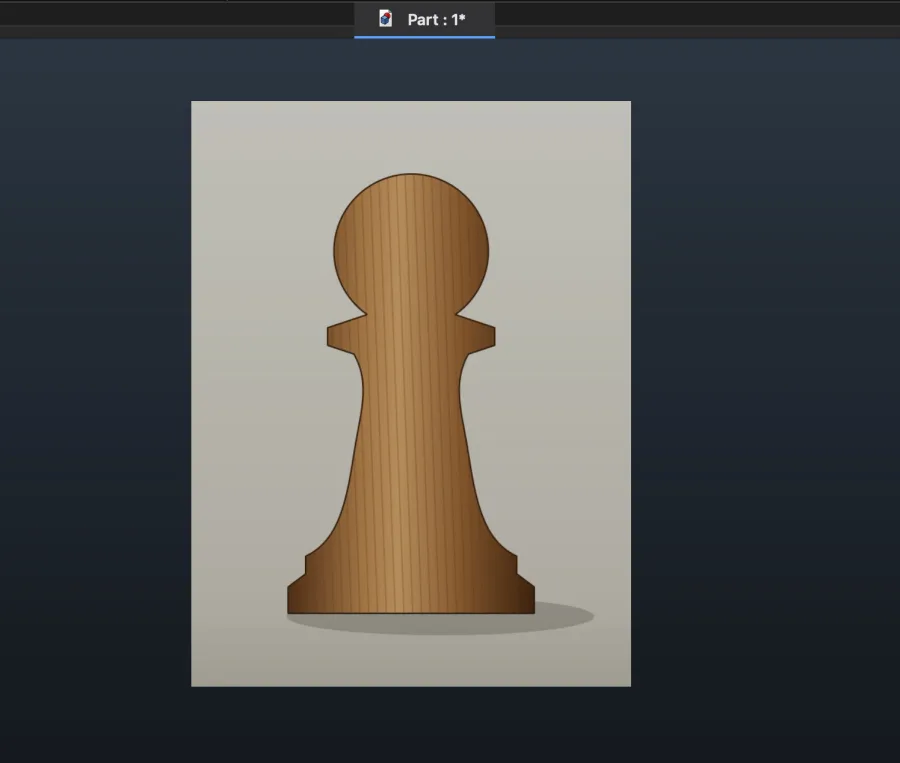
A photo of a pawn on the XZ plane

1A photo

Image ▸ Insert Image, On XZ — the picture stands upright

Scaling the photo by two points

2Scale

Two points, foot and top: Real length 50 mm

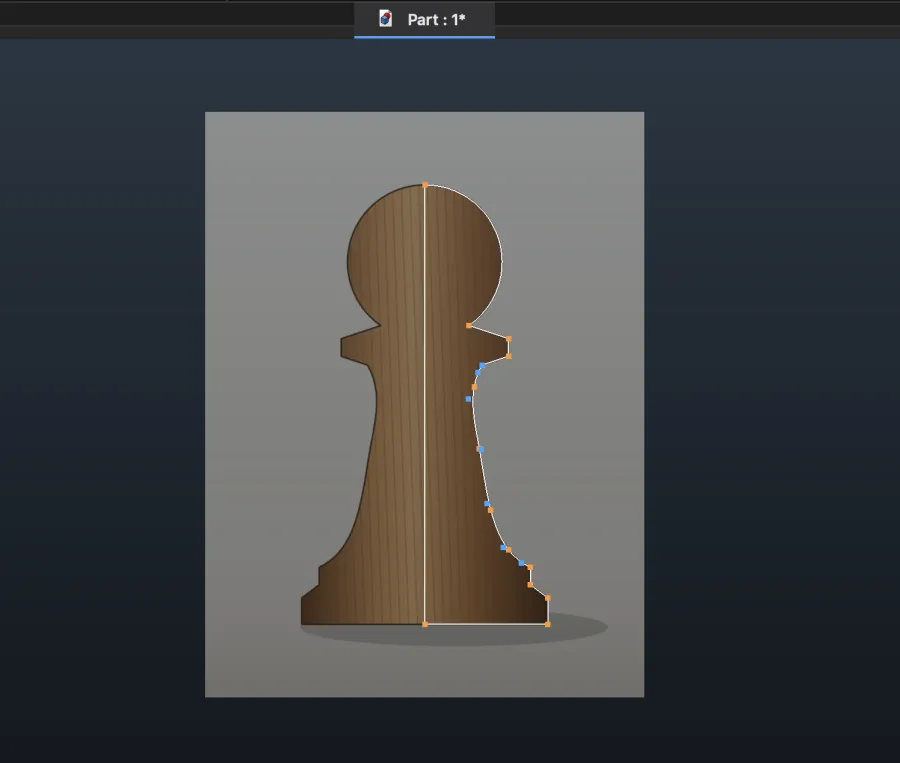
Half the outline sketched over the photo

3Sketch

Half the silhouette over the photo

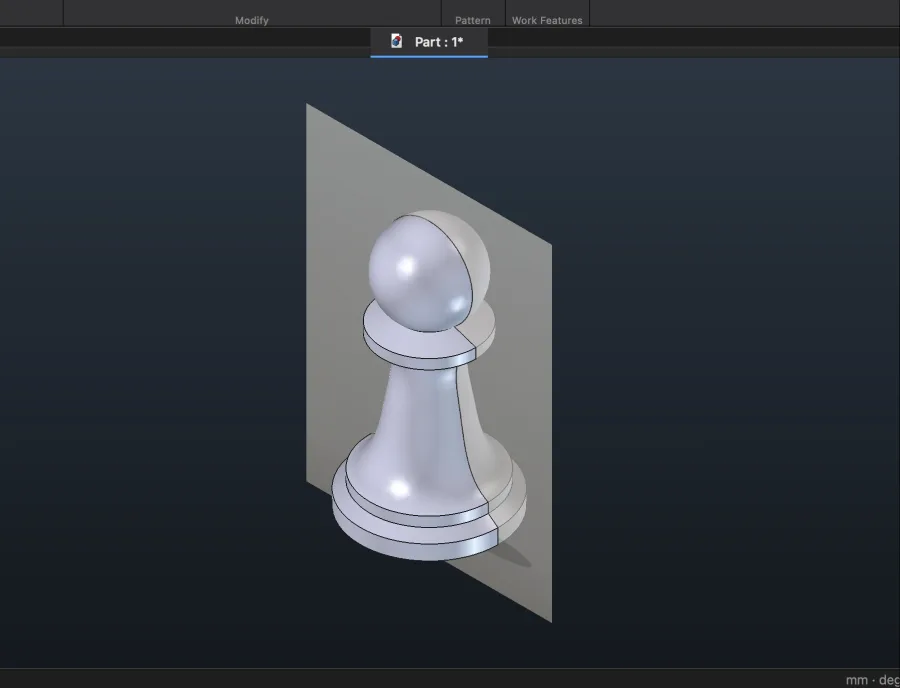
The pawn revolved

4Revolve

About Z — the pawn is exactly 50 mm

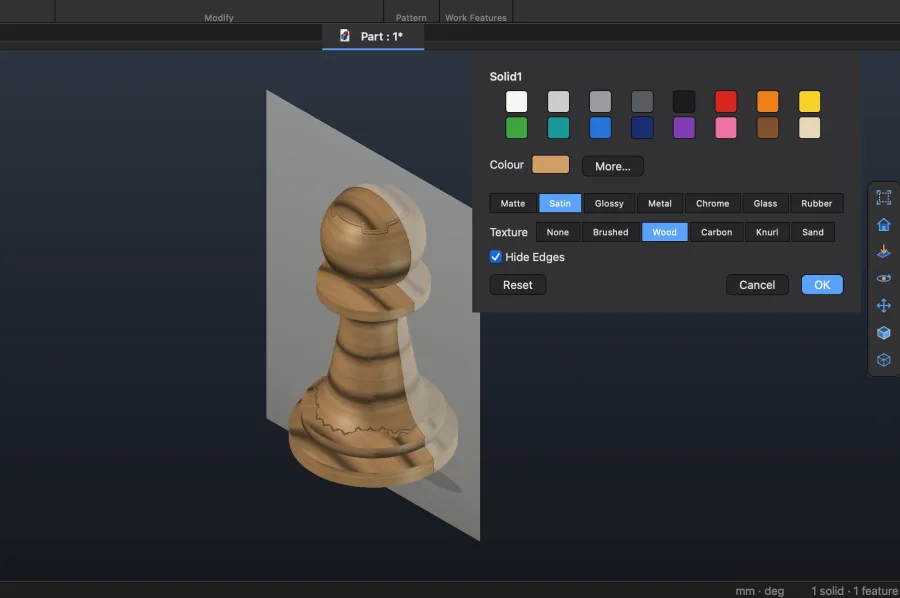
Appearance on the pawn

5Appearance

Wood, Satin, Hide Edges — on the part at once

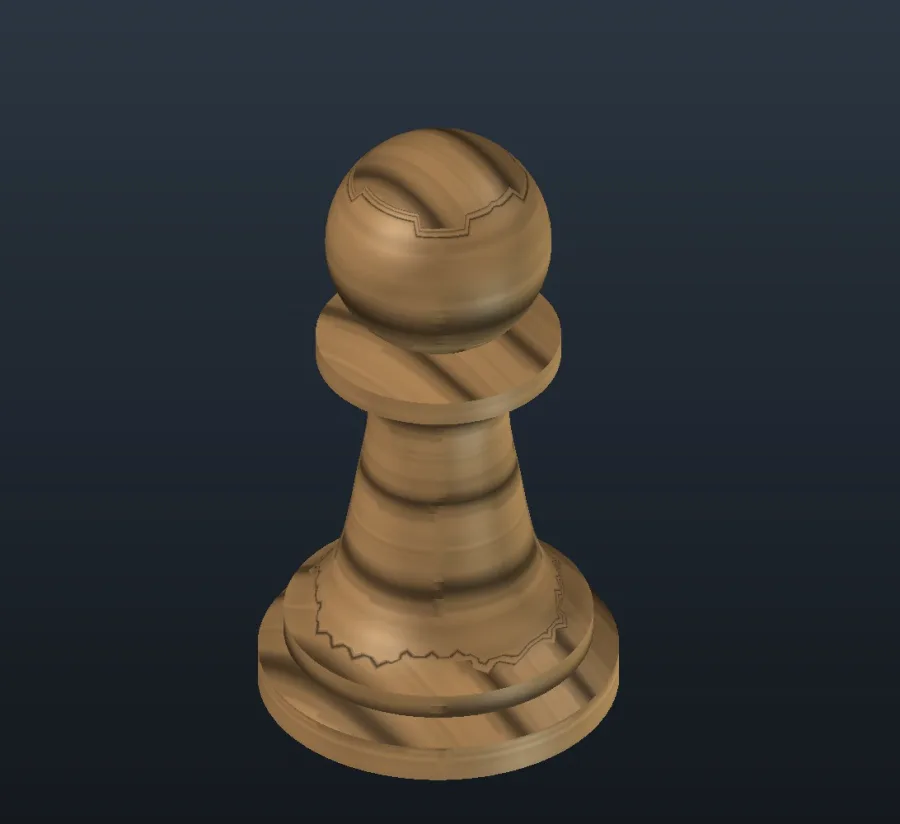
A wooden pawn
Wood · Satin
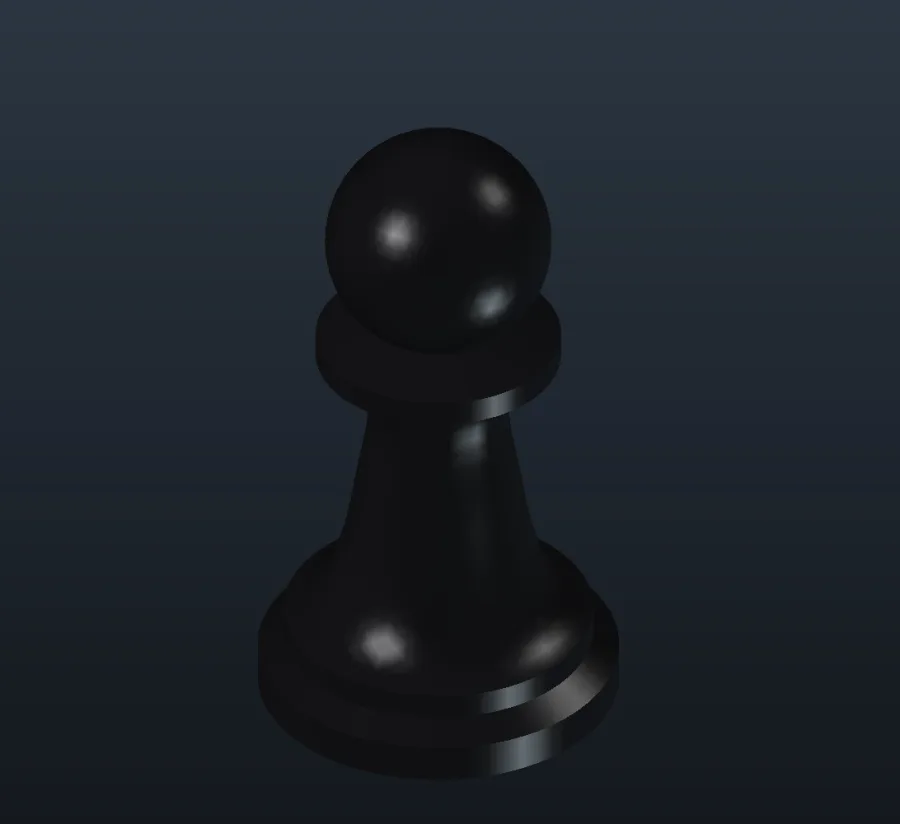
A glossy black pawn
Glossy, black
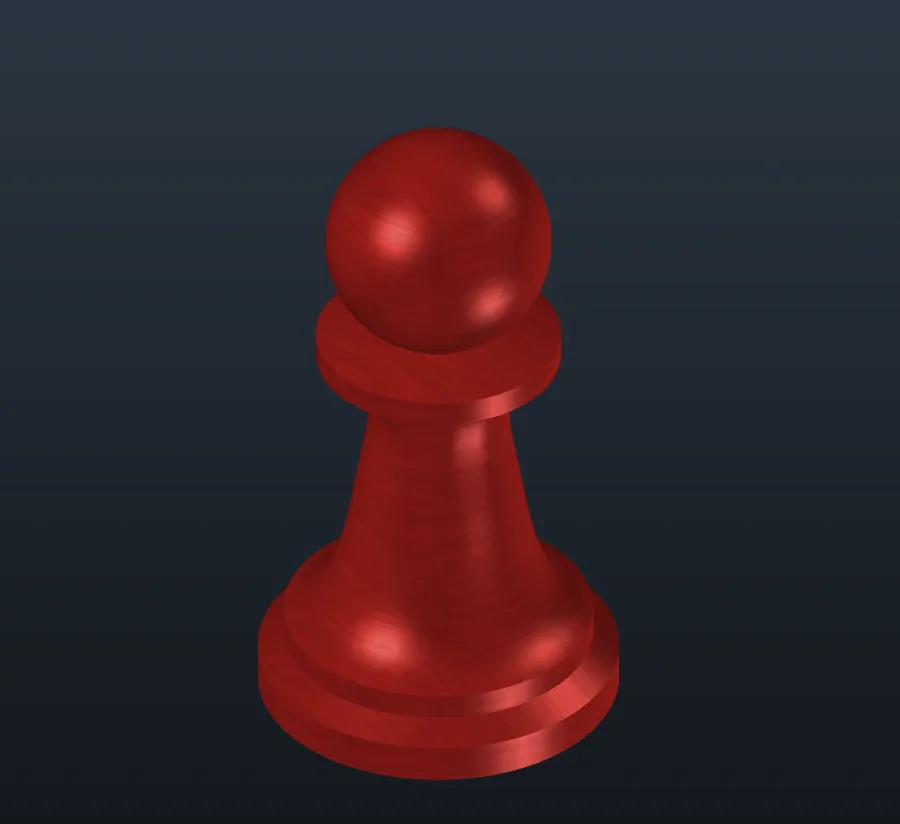
A red brushed-metal pawn
Metal + Brushed
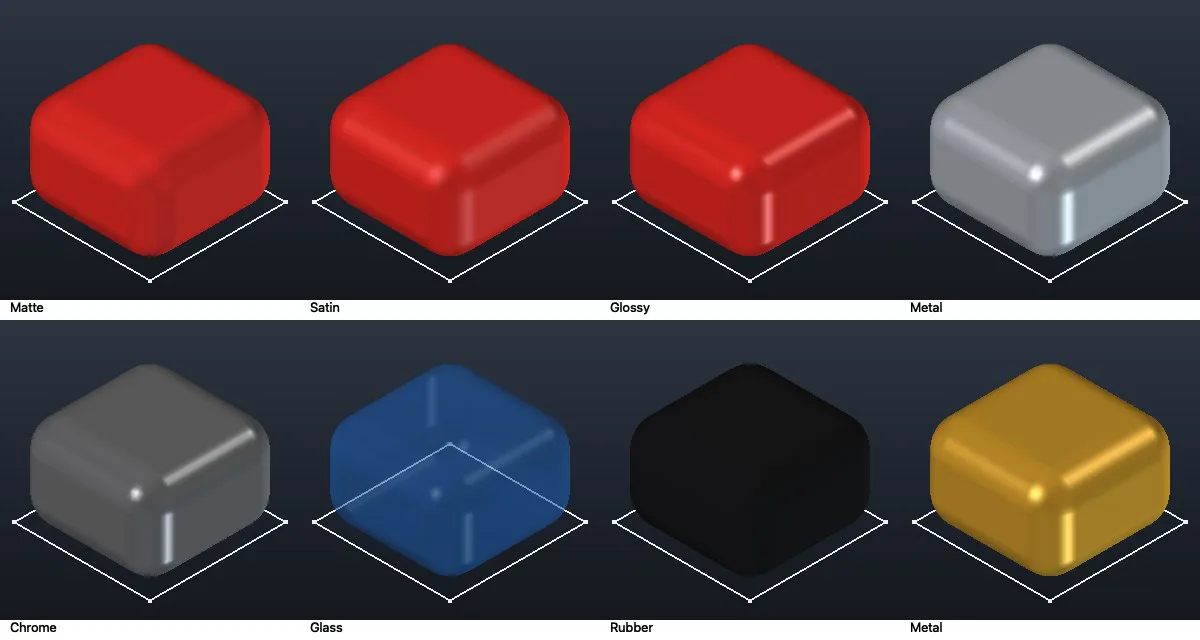
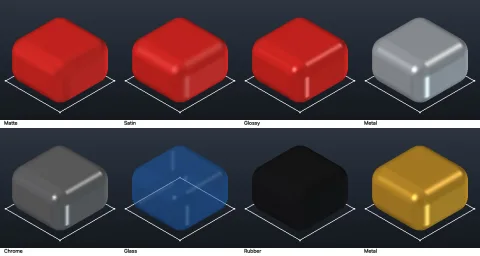
Finishes: Matte, Satin, Glossy, Metal, Chrome, Glass, Rubber

Tools ▸ Material ▸ Appearance

Color and finish

  • Any color from the palette or More…
  • Matte, Satin, Glossy, Metal, Chrome, Glass, Rubber
  • Picked faces, Solids or the whole part; Hide Edges takes the edge lines off
  • Shown at once; OK is one Undo step
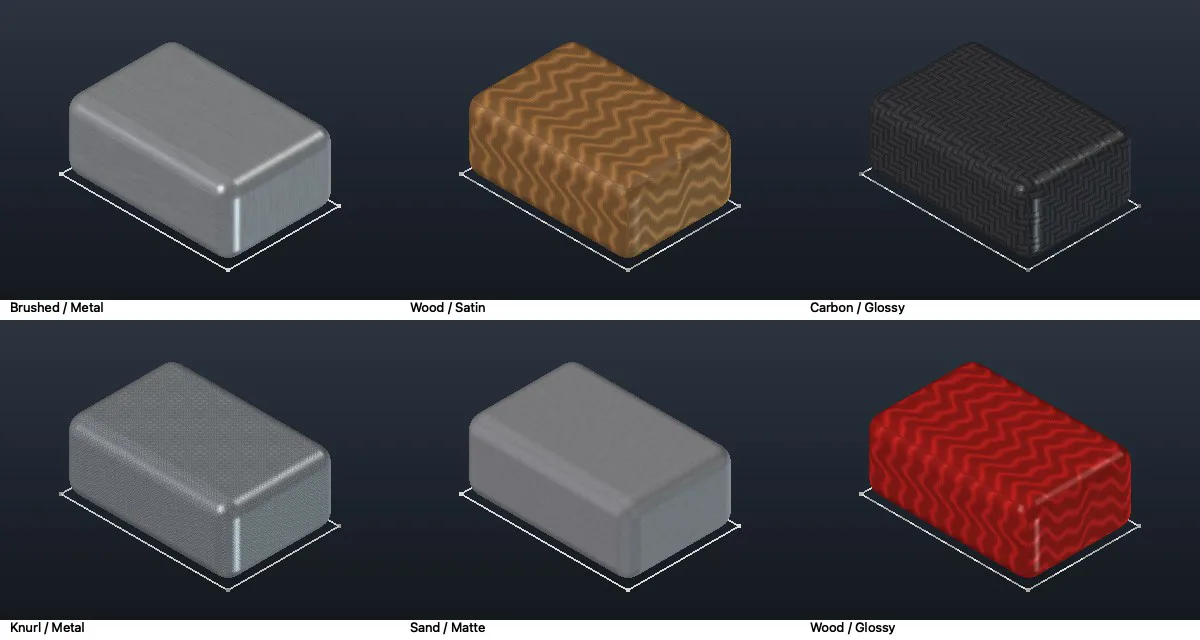
Textures: Brushed, Wood, Carbon, Knurl, Sand

Appearance ▸ Texture

Textures over the color

  • Brushed, Wood, Carbon, Knurl, Sand
  • The color shows through: a red part gets red wood
  • The pattern keeps its real size on any part
  • Saved in the file, shown in assemblies too
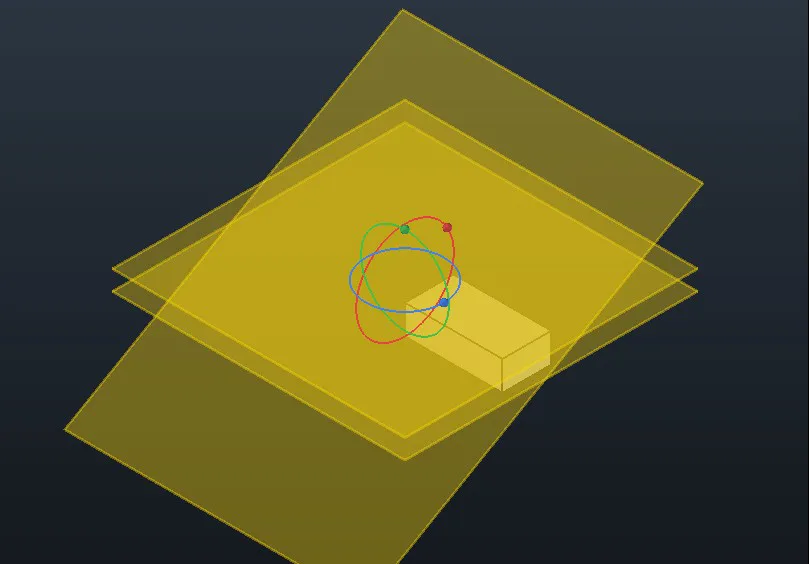
A series of turned work planes
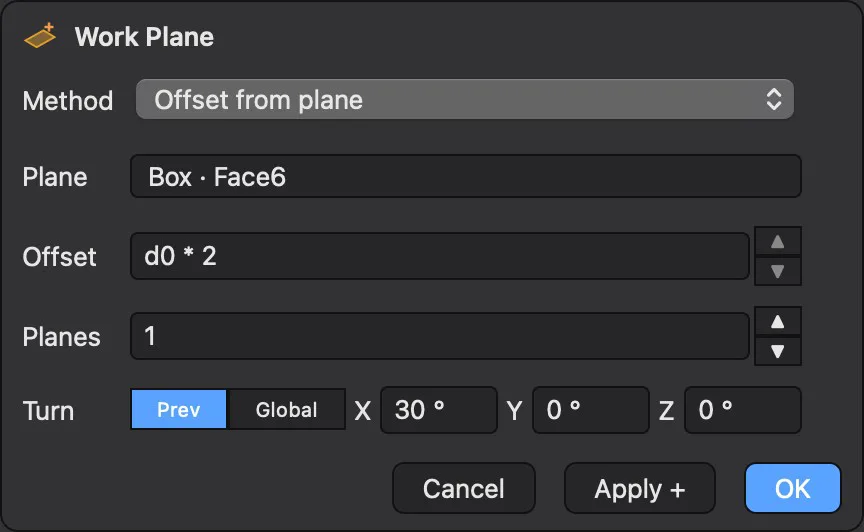
The Work Plane dialog with Planes and Turn

Work Plane

Loft planes — several at once, and turned

  • Offset ▸ Planes: 2×, 3×… the offset in one go
  • Turn about X, Y, Z of the previous plane or the global axes
  • Typed, or dragged on rings
Axes of the engine's turned parts and holes, shown as light centre lines

Assembly

Axes to constrain to

  • Every turned body and hole shows its axis as a light center line
  • Mate, Flush, Insert, Cylindrical, Parallel take an axis with a click
  • Make Assembly keeps the parts' names

STL → STEP

STL into STEP with AI

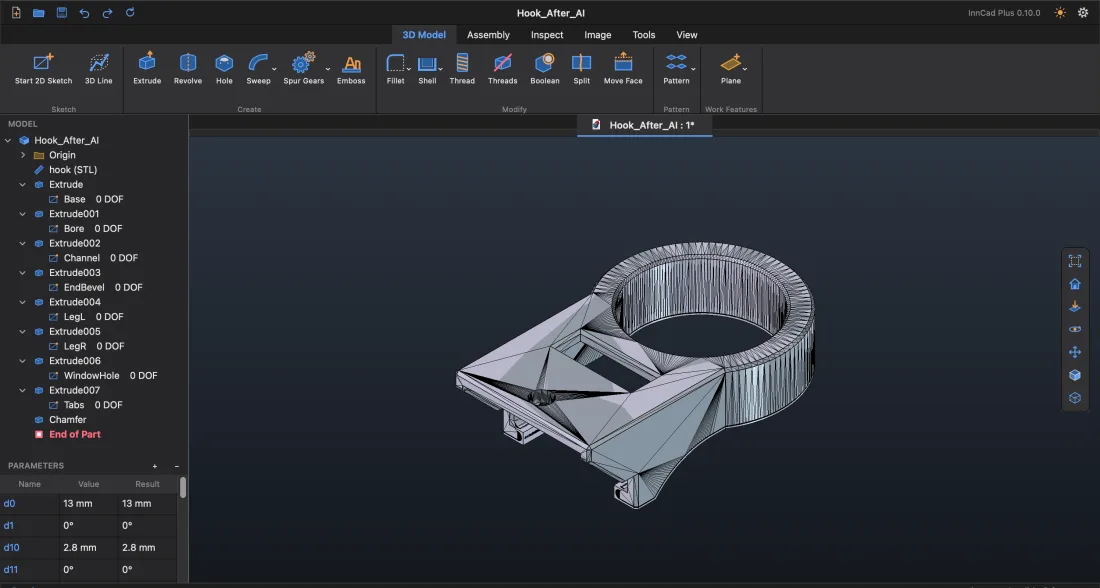
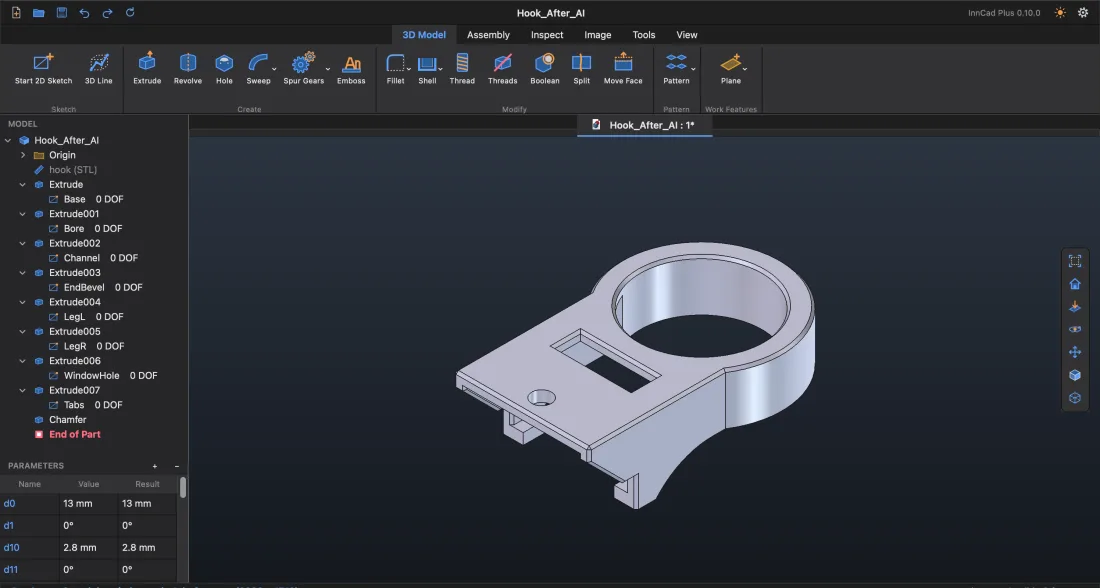
An STL is a mesh of triangles: a slicer prints it, but you cannot change a size or open it as a solid in another CAD. Connect your AI, and it rebuilds the STL in ProstoCAD as a real part — sketches, Extrude, Revolve, sizes you can edit — ready to save as STEP. Or do it yourself with the STL tools below.

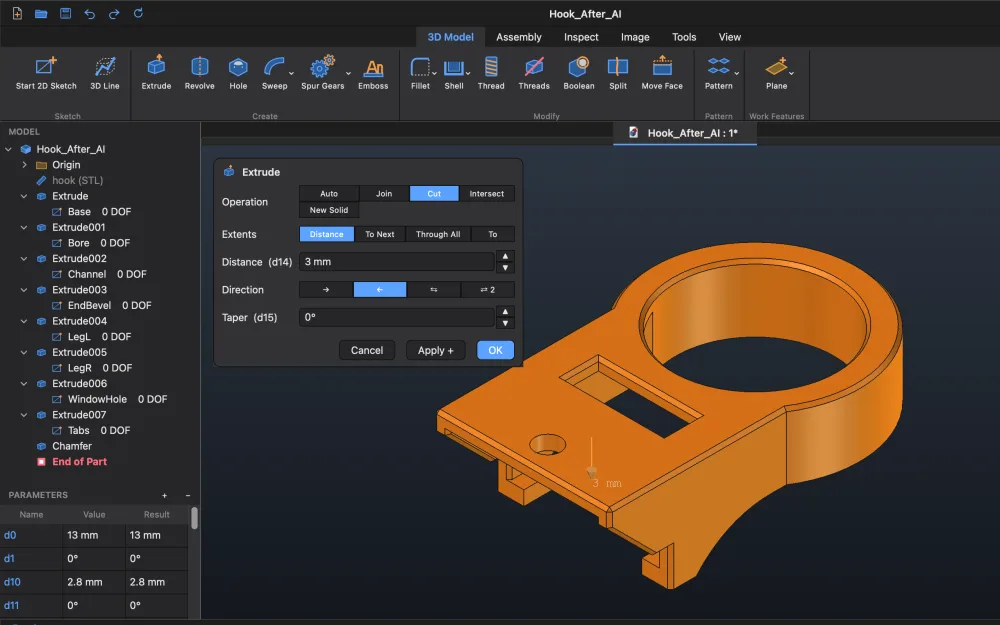
Before: the hook's STL, a mesh of triangles
Before · STL: a mesh of triangles
→
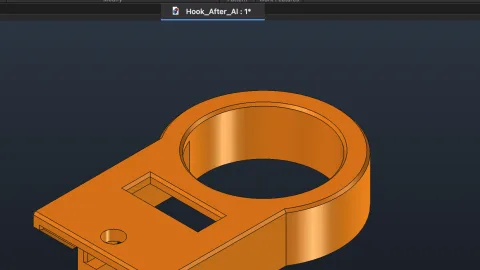
After: the hook rebuilt by AI as features
After · built by AI: 9 features in the history, sizes you can edit
Before: an iPhone case as STL
Before · STL of an iPhone case
→
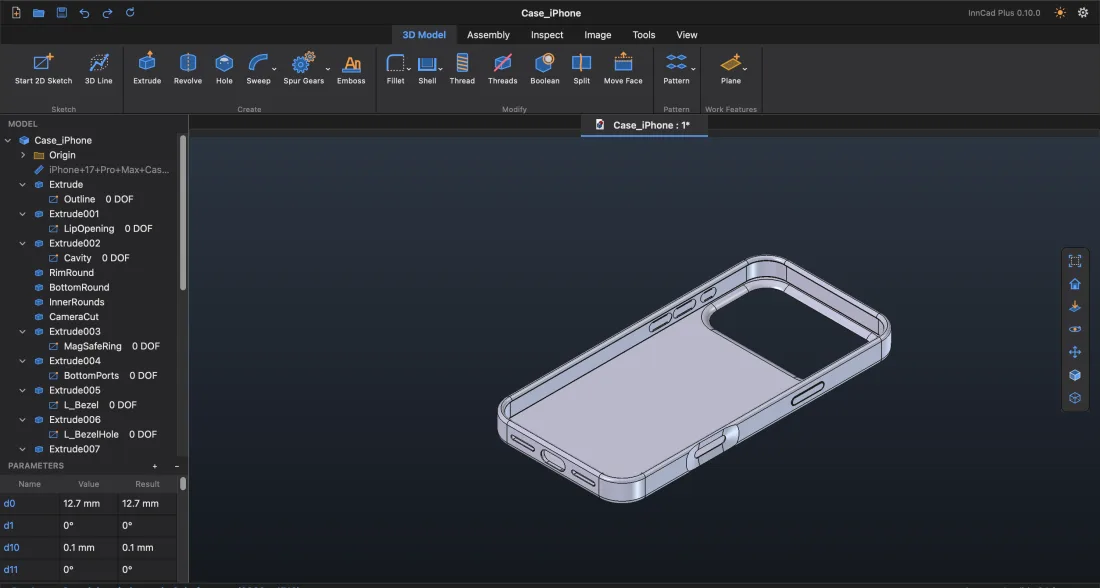
After: the iPhone case rebuilt by AI
After · built by AI: 24 features, ready to save as STEP
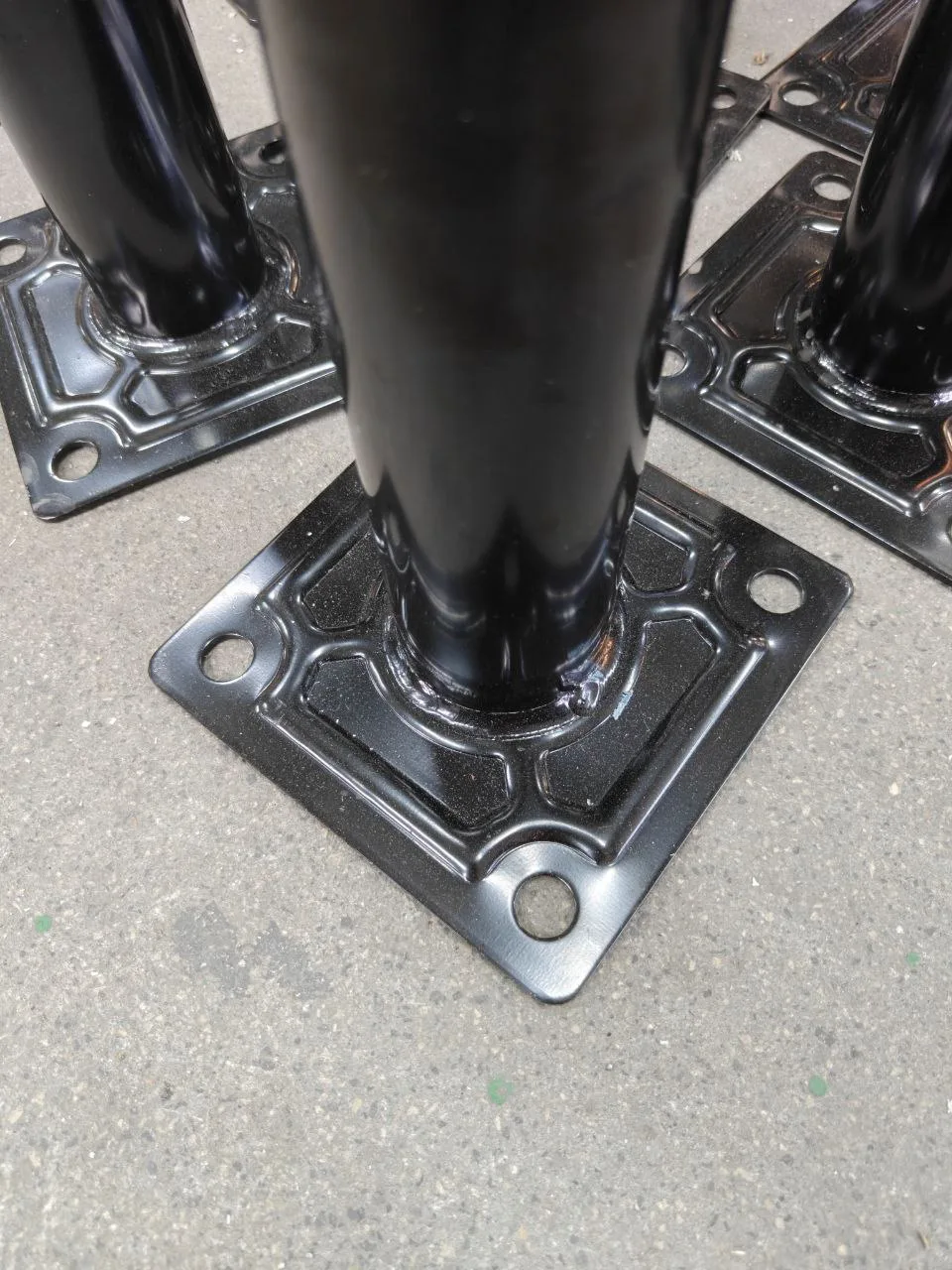
Before: a photo of a table leg's stamped base plate
Before · just a photo of a table leg
→
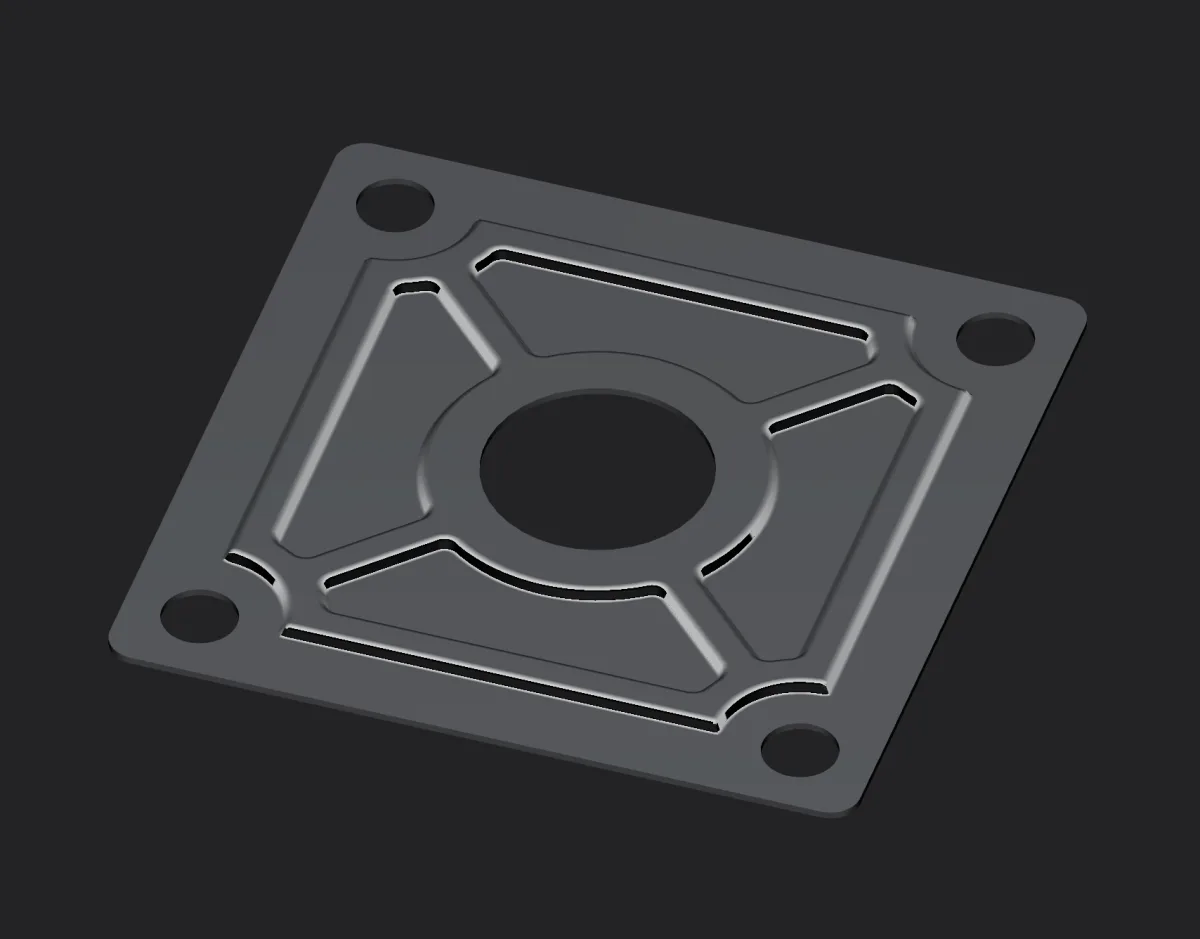
After: the base plate built by AI from the photo, its STEP in Plasticity
After · built by AI from one photo, saved as STEP and opened in Plasticity
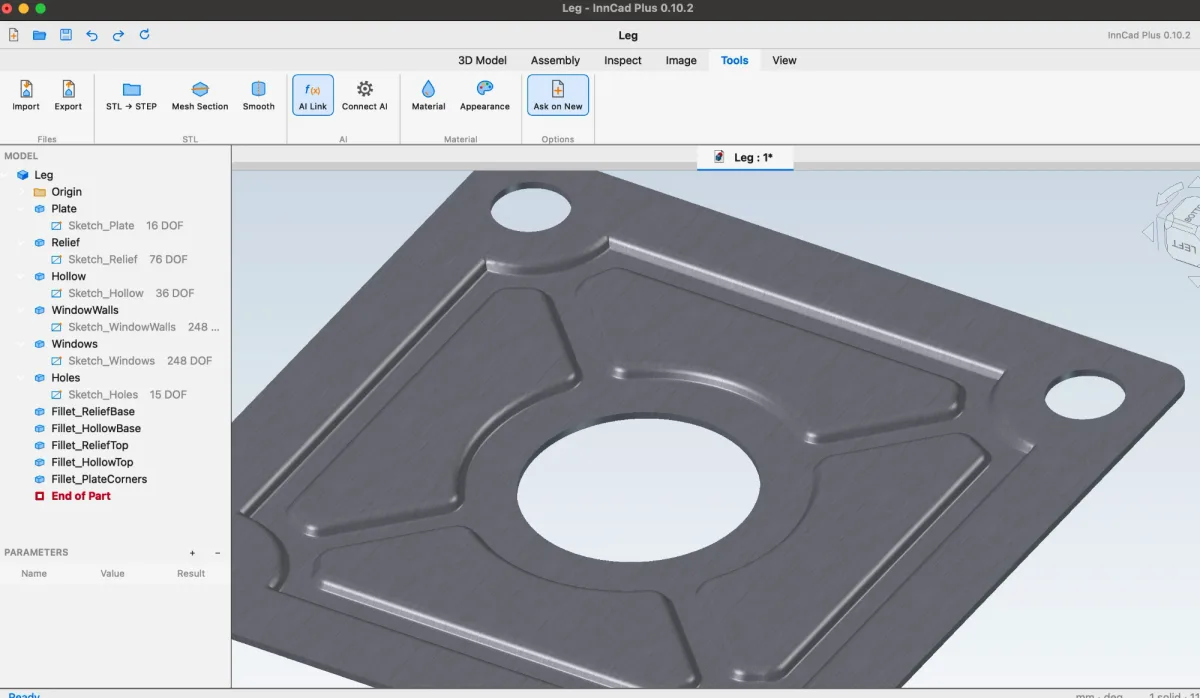
The base plate in ProstoCAD from below, its features in the Model Browser
ProstoCAD · the underside: 11 features in the history, sizes you can edit
Both sides: a stamped plate of even thickness
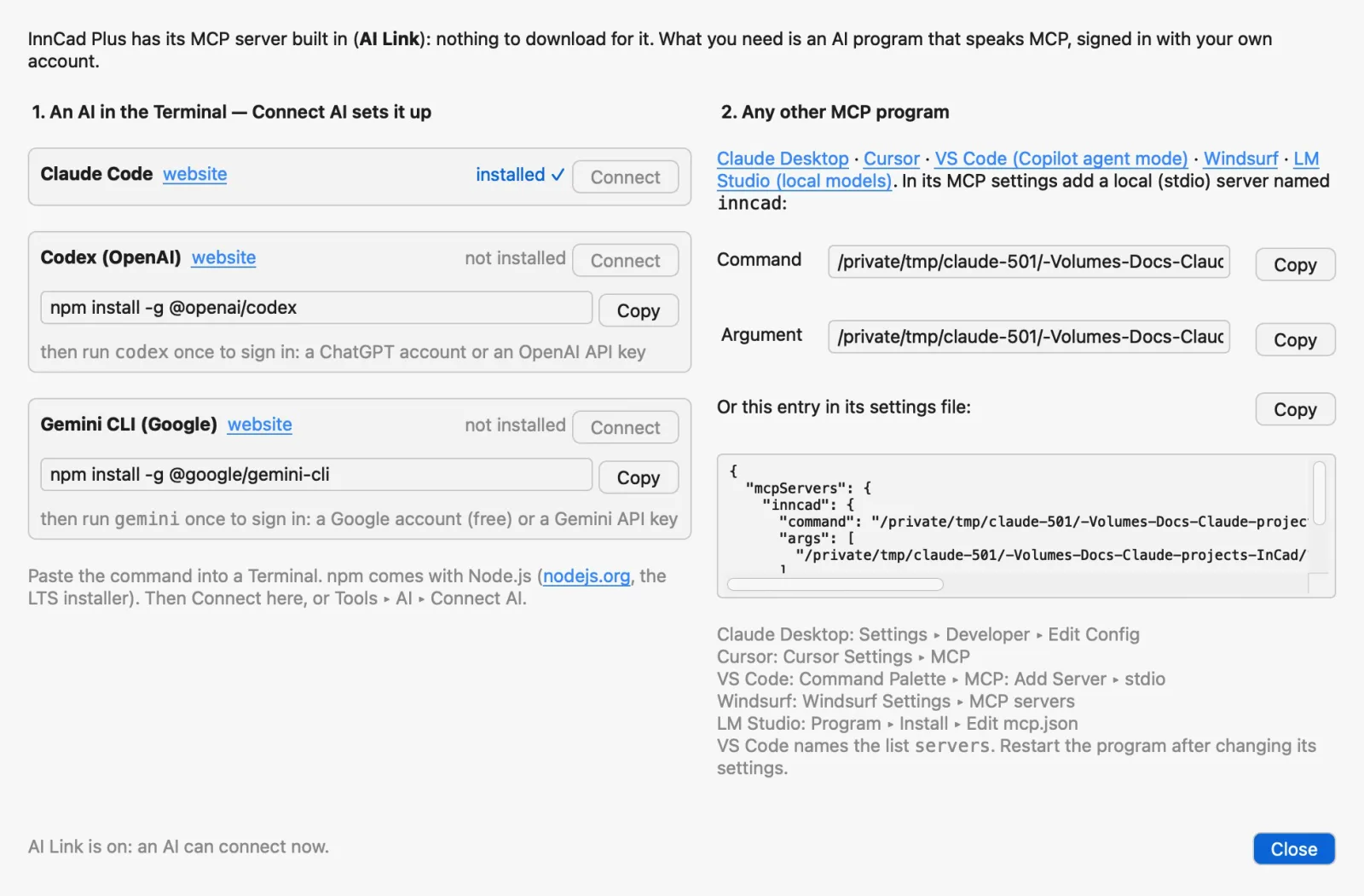
The Connect AI window: Claude Code, Codex, Gemini CLI and other MCP programs

Tools ▸ AI ▸ Connect AI

One button, and your AI is in ProstoCAD

  • Claude Code installed? Connect AI opens a Terminal with it in the part's folder, no questions
  • The MCP server is built in — nothing to download
  • No AI yet? The window shows where to get Claude Code, Codex or Gemini CLI and the install command
  • Claude Desktop, Cursor, VS Code, Windsurf, LM Studio: ready paths and JSON to copy
  • The AI's features stay in the Model Browser like yours: edit them, or Undo each step

“Rebuild the STL in ProstoCAD as a part, sharp edges first.”

How to connect, step by step

01Import

The STL comes in as it is; the status line counts its triangles.

02STL → STEP

The mesh becomes a solid of its triangles, ready to export as STEP.

03Mesh Section

Cut the STL by a plane: a sketch of lines, arcs and circles with round sizes.

04Smooth

A turned part rebuilt as features: a sketch, Revolve, Grooves, a Thread with the measured pitch.

AI · MCP

Connect your AI — step by step

ProstoCAD has an MCP server built in (AI Link): nothing to download for it. Any AI program that speaks MCP can work in your ProstoCAD window — look at the part, measure an STL, build features you can edit.

AThe quick way: Connect AI

  1. Install an AI command-line program and sign in with your own account: Claude Code, Codex (OpenAI) or Gemini CLI (Google). Run it once in a Terminal to sign in.

    Claude Code · installer on its page

    npm install -g @openai/codex
    npm install -g @google/gemini-cli

    Codex and Gemini CLI need Node.js (the LTS installer).

  2. In ProstoCAD, open the part or import the STL.
  3. Tools ▸ AI ▸ Connect AI. A Terminal opens in the part's folder with the AI already connected to ProstoCAD — no questions. The first time, macOS asks whether ProstoCAD may control Terminal: allow it.
  4. Tell the AI what you want, in your words:
    “Rebuild the STL in ProstoCAD as a part, sharp edges first.” “Optimize this part for 3D printing with as few supports as possible.” “Put an M6 thread in the hole on the top face.”

No AI installed yet? Connect AI shows each one's page and the command that installs it, with Copy.

BAny other MCP program

Add a local (stdio) MCP server named inncad in the program's MCP settings:

Claude DesktopSettings ▸ Developer ▸ Edit Config
CursorCursor Settings ▸ MCP
VS Code (Copilot agent mode)Command Palette ▸ MCP: Add Server ▸ stdio
WindsurfWindsurf Settings ▸ MCP servers
LM Studio (local models)Program ▸ Install ▸ Edit mcp.json
ClineMCP Servers ▸ Configure

Command

/Applications/ProstoCAD.app/Contents/Resources/bin/python3

Argument

/Applications/ProstoCAD.app/Contents/Resources/Mod/InCad/incad/ai_bridge.py

Settings file (Claude Desktop, Cursor, Windsurf, LM Studio, Cline)

{
  "mcpServers": {
    "inncad": {
      "command": "/Applications/ProstoCAD.app/Contents/Resources/bin/python3",
      "args": [
        "/Applications/ProstoCAD.app/Contents/Resources/Mod/InCad/incad/ai_bridge.py"
      ]
    }
  }
}

VS Code (.vscode/mcp.json)

{
  "servers": {
    "inncad": {
      "type": "stdio",
      "command": "/Applications/ProstoCAD.app/Contents/Resources/bin/python3",
      "args": [
        "/Applications/ProstoCAD.app/Contents/Resources/Mod/InCad/incad/ai_bridge.py"
      ]
    }
  }
}

Command

C:\ProstoCAD\runtime\bin\python.exe

Argument

C:\ProstoCAD\runtime\Mod\InCad\incad\ai_bridge.py

Settings file (Claude Desktop, Cursor, Windsurf, LM Studio, Cline)

{
  "mcpServers": {
    "inncad": {
      "command": "C:\\ProstoCAD\\runtime\\bin\\python.exe",
      "args": [
        "C:\\ProstoCAD\\runtime\\Mod\\InCad\\incad\\ai_bridge.py"
      ]
    }
  }
}

VS Code (.vscode/mcp.json)

{
  "servers": {
    "inncad": {
      "type": "stdio",
      "command": "C:\\ProstoCAD\\runtime\\bin\\python.exe",
      "args": [
        "C:\\ProstoCAD\\runtime\\Mod\\InCad\\incad\\ai_bridge.py"
      ]
    }
  }
}

Write the whole path, not ~. In your home folder's Applications? Use /Users/you/Applications/…; on Windows, your ProstoCAD folder instead of C:\ProstoCAD. Connect AI shows the exact paths of your installation, with Copy. Restart the program after changing its settings.

What the AI can do in ProstoCAD

Look

statusviewmesh_infomesh_sectionfit_atcompare

Build

new_solidsketchextruderevolvefilletchamferthread

Pick and fix

find_facesfind_edgesdeleteundorun_python

Every feature the AI makes lands in the Model Browser like yours: edit it, delete it or Undo it.

Safe and under your control

  • AI Link (on by default) listens only on this computer and only to programs that know the key ProstoCAD keeps in its settings folder.
  • Switch it off in Tools ▸ AI ▸ AI Link, and no AI can reach ProstoCAD.
  • The AI program and its account are your own choice.
  • Ask for the plain shape first, fillets and chamfers after — easier to check. Tried with Claude; small local models lose track of sizes and planes.
  • Work on copies and check what the AI built before you trust a size.
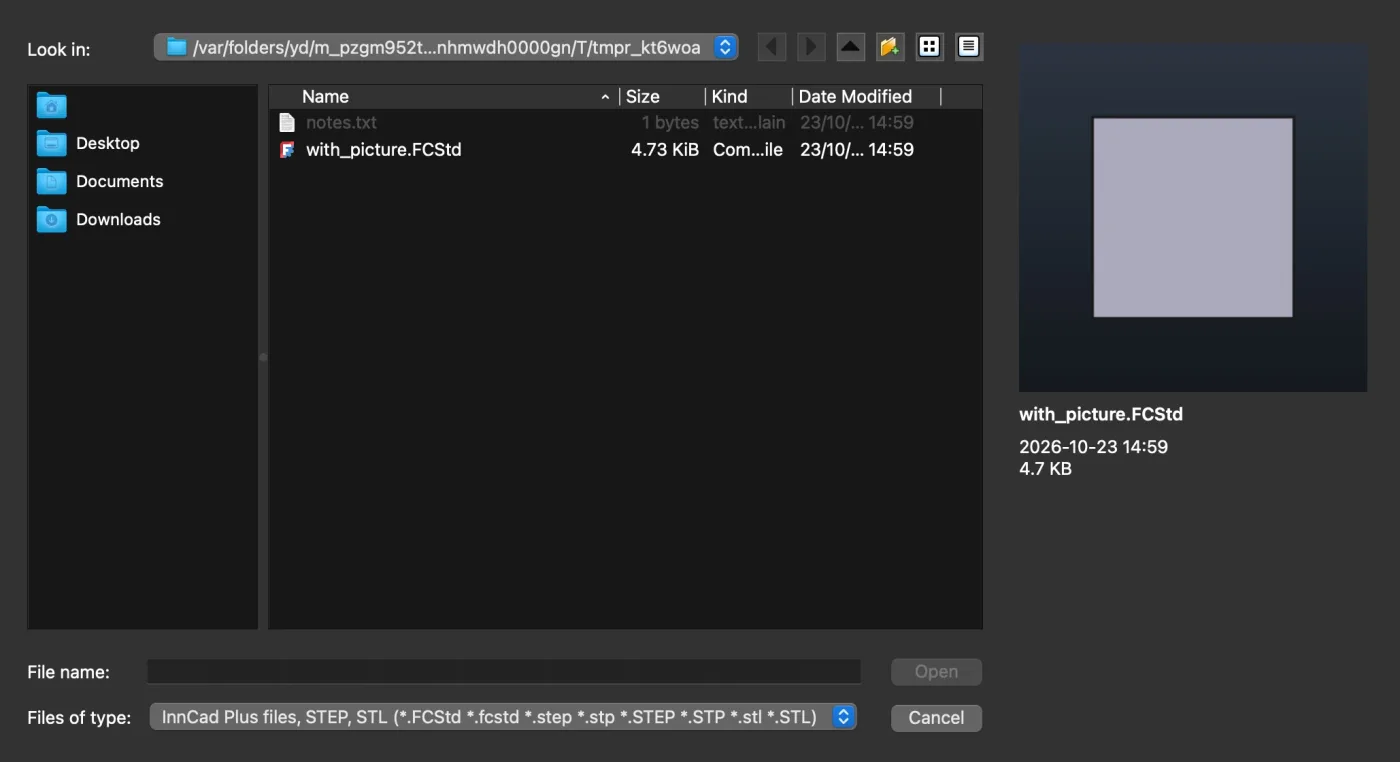
The Open window with file previews

And more

Small things that save time

  • Open with previews: FCStd, STEP, STL — picture, date, size
  • Import STEP, IGES, OBJ; JPG / PNG to sketch over
  • Screenshot of the view or the whole window, PNG with a transparent background too
  • Extrude to any face, edge, point or axis; its own extents for the second side
  • Fillet ▸ Full: a full round between two edges
  • Light and dark themes; tips in blue, errors in red

Documentation

Quick Start and What's New in five languages; the full manuals in English and Russian.

Open the manual →
User Manual (Windows)

User Manual (Windows)

The same manual with Windows keys, paths and install.

User Manual (Mac)

User Manual (Mac)

Every tool step by step, with the STL and AI chapter.

?

Frequently Asked Questions

Quick answers to common questions.

Is ProstoCAD free?

Yes. Download it and use it for free.

Do I need FreeCAD installed?

No. The FreeCAD 1.1.3 engine is inside ProstoCAD. It keeps its own settings and does not touch an installed FreeCAD.

macOS says it cannot verify the app

The test build is not notarized by Apple. Click Done (not Move to Trash), open System Settings ▸ Privacy & Security, scroll to “ProstoCAD was blocked…” and click Open Anyway, then confirm with your password. Needed only once.

On macOS 13 and 14 a right-click on the app ▸ Open does the same. Or in Terminal: xattr -dr com.apple.quarantine /Applications/ProstoCAD.app

Does it run on Intel Macs or Linux?

Linux: a version is coming soon. Intel Macs: not in this build. Today ProstoCAD runs on Macs with Apple Silicon (M1 or newer, macOS 13 or newer) and on Windows 10 / 11 x64.

Which file formats does it read and write?

Opens FreeCAD files (.FCStd), STEP and STL; imports IGES, OBJ and JPG / PNG / BMP pictures to sketch over; exports STEP (exact solids) and STL (with a precision slider for slicers).

Can FreeCAD open my files?

Yes. A part is a FreeCAD PartDesign body, a sketch a Sketcher sketch, an assembly uses FreeCAD's own joints: plain .FCStd files. ProstoCAD opens files made in FreeCAD too.

What does the AI need?

An AI command-line tool signed in with your own account: Claude Code, Codex or Gemini CLI (Codex and Gemini CLI need Node.js). Connect AI shows where to get them. AI Link listens only on your computer and only to programs with the ProstoCAD key; switch it off and no AI can reach ProstoCAD.

Something went wrong. How do I report it?

Chapter 11 of the manual says where the log is and what to send; then write to us — see Contact.

A one-person project

ProstoCAD is made by one person. Wishes, bug reports and requests are welcome — please forgive me in advance if fixing a bug or making a wish come true takes a while.

Send a wish or a bug